
Series of Cubes
Loading the math board and drawing, please wait…
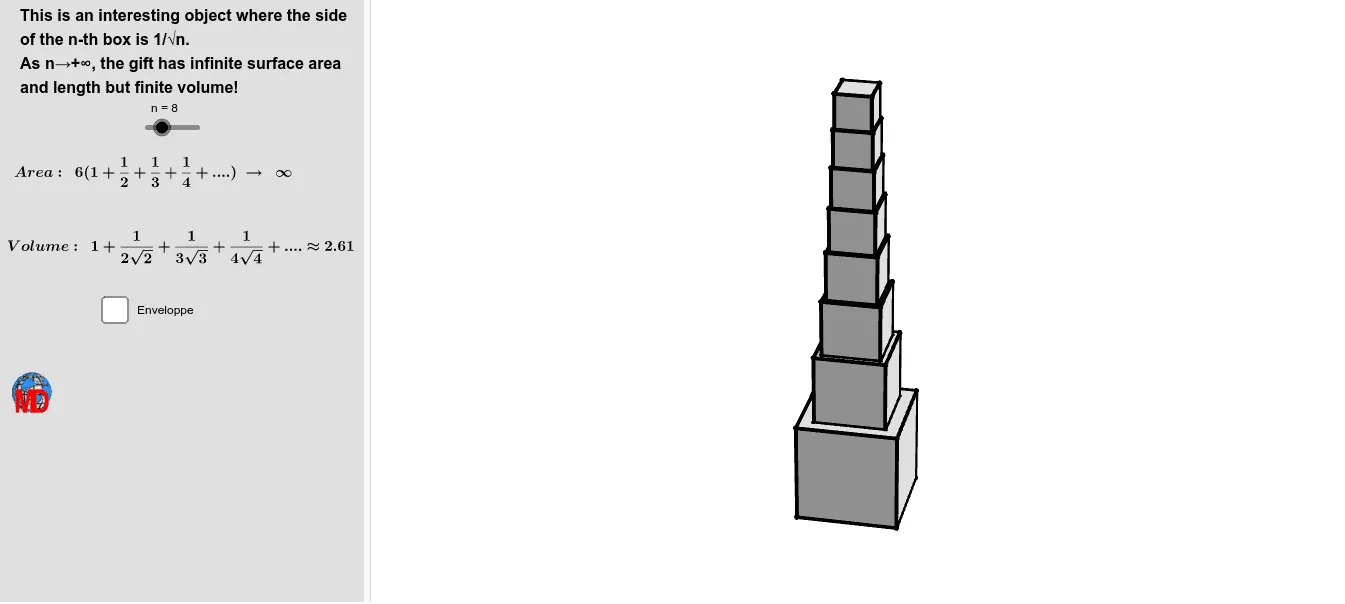
This example demonstrates the construction of a series of cubes. It involves key concepts in sequences and solid geometry. Using GeoGebra commands such as Sequence, Join, Rotate, Translate, etc., it dynamically shows the arrangement and rotation of cubes. Suitable for high school mathematics education, particularly in solid geometry and sequences.
GeoGebra Commands & Parameters
Sequence(1 / sqrt(i), i, 1, m_1) → l1Join({{0}, Sequence[Sum[Sequence[Element[l1, j], j, 1, i]], i, 1, m_1]}) → l4Sequence(Translate[(Element[l1, i] / 2, Element[l1, i] / 2, 0), Vector[(0, 0, 0), (0, 0, Element[l4, i])]], i, 1, m_1 - 1) → l51Rotate(l51, π / 2, zAxis) → l52Rotate(l51, (2 * π / 2), zAxis) → l53Rotate(l51, (3 * π / 2), zAxis) → l54Sequence(Translate[Element[l51, i], Vector[(0, 0, 0), (0, 0, Element[l1, i])]], i, 1, Length[l51]) → l61Sequence(Translate[Element[l52, i], Vector[(0, 0, 0), (0, 0, Element[l1, i])]], i, 1, Length[l52]) → l62Sequence(Translate[Element[l53, i], Vector[(0, 0, 0), (0, 0, Element[l1, i])]], i, 1, Length[l53]) → l63Sequence(Translate[Element[l54, i], Vector[(0, 0, 0), (0, 0, Element[l1, i])]], i, 1, Length[l54]) → l64Sequence(Polygon[Element[l51, i], Element[l52, i], Element[l62, i], Element[l61, i]], i, 1, Length[l51]) → l72Sequence(Polygon[Element[l51, i], Element[l52, i], Element[l53, i], Element[l54, i]], i, 1, Length[l51]) → l71Sequence(Polygon[Element[l61, i], Element[l62, i], Element[l63, i], Element[l64, i]], i, 1, Length[l51]) → l73Rotate(l72, π / 2, zAxis) → l74Rotate(l72, (2 * π / 2), zAxis) → l75Rotate(l72, (3 * π / 2), zAxis) → l76Translate(l71, Vector[(0, 0, 0), (0, 0, 0)]) → l81Translate(l72, Vector[(0, 0, 0), (0, 0, 0)]) → l82Translate(l73, Vector[(0, 0, 0), (0, 0, 0)]) → l83Translate(l74, Vector[(0, 0, 0), (0, 0, 0)]) → l84Translate(l75, Vector[(0, 0, 0), (0, 0, 0)]) → l85Translate(l76, Vector[(0, 0, 0), (0, 0, 0)]) → l86Sequence(Element[l1, i]^(3), i, 1, Length[l1]) → l9Sum(l9) → laSum(l71) → lbSequence(Centroid[Element[l76, i]], i, 1, Length[l76]) → l2Sequence(Text["\sqrt" + (k), Element[l2, k] + (0.1, 0, 0.2), true, true], k, 1, n) → l3Sequence(CurveCartesian[x(O) + ((R * a / i) * cos(j)), y(O) + ((R * a / i) * sin(j)), z(O) + (R * i) - 0.7, i, π / m, n], j, 0, (2 * π), π / m) → l5Surface(x(O) + ((R * a / i) * cos(j)), y(O) + ((R * a / i) * sin(j)), z(O) + (R * i) - 0.5, i, π / m, n, j, 0, 6.28319) → b
AI Drawing Prompt Reference
Draw a series of cubes that gradually decrease in size, demonstrating their construction and rotation. Start by generating a sequence to represent the heights of the cubes, then connect these height points to form the bases of the cubes. Next, translate and rotate these bases along the height to create multiple cubes. Finally, connect the faces of these cubes using polygons and display their dynamic rotation.
The prompt above was compiled from the original drawing commands and is for reference only.