
Self-Quiz: What's That Isometry?
Loading the math board and drawing, please wait…
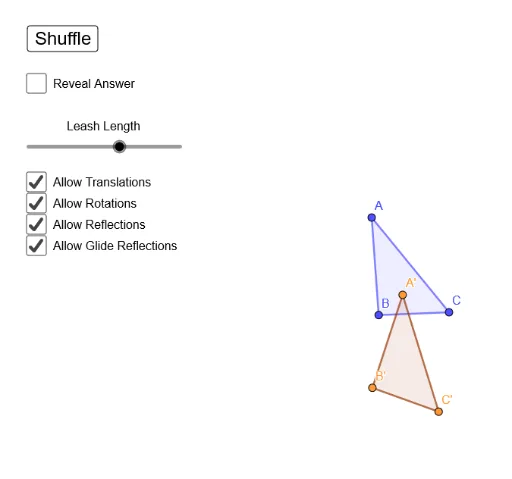
① This interactive self-quiz presents a triangle and its images under various rigid motions (translations, rotations, reflections), challenging learners to identify each transformation type. ② Core mathematical concepts include isometries (translation, rotation, reflection), congruence, area preservation, and composition of transformations. ③ Construction details: Based on the summary, GeoGebra commands such as Polygon, Vector, Angle, Translate, Rotate, Mirror, Dilate, Segment, Circle, Ray, CircleArc, and Join are used to create the original triangle ABC and multiple images (e.g., A'B'C', A''B''C''), likely with sliders or buttons to toggle visibility. ④ Suitable for middle or high school geometry classes or self-study, this activity reinforces understanding of rigid motion properties and sharpens visual reasoning skills.
GeoGebra Commands & Parameters
Polygon(B, C, A) → t1, a, b, cVector(E, D) → uAngle(D, E, F) → αTranslate(B, u) → B'Translate(C, u) → C'Translate(A, u) → A'Polygon(B', C', A') → t1', a', b', c'Rotate(B, α, E) → B'_1Rotate(C, α, E) → C'_1Rotate(A, α, E) → A'_1Polygon(B'_1, C'_1, A'_1) → t1'_1, a'_1, b'_1, c'_1Line(E, D) → fMirror(B, f) → B'_2Mirror(C, f) → C'_2Mirror(A, f) → A'_2Polygon(B'_2, C'_2, A'_2) → t1'_2, a'_2, b'_2, c'_2Mirror(B', f) → B''Mirror(C', f) → C''Mirror(A', f) → A''Polygon(B'', C'', A'') → t1'', a'', b'', c''Corner(1) → BLCorner(2) → BRCorner(3) → TRCorner(4) → TLPolygon(BL, BR, TR, TL) → q1, bl, br, tr, tlDilate(BL, e, CTR) → BL'Dilate(BR, e, CTR) → BR'Dilate(TR, e, CTR) → TR'Dilate(TL, e, CTR) → TL'Polygon(BL', BR', TR', TL') → q1', bl', br', tr', tl'Vector((30 * CTR) - (10 * (A + B + C))) → vSegment(BL, TR) → iCircle(E, i) → pAngle(A, E, A'_1) → βRay(E, A) → jRay(E, A'_1) → kVector(A, A') → wSegment(A', A'') → lVector(B, B') → mVector(C, C') → nSegment(B', B'') → qSegment(C', C'') → sSegment(A, A'_2) → rSegment(B, B'_2) → tSegment(C, C'_2) → f_1CircleArc(E, A, A'_1) → c_1CircleArc(E, A'_1, A) → d_1CircleArc(E, B, B'_1) → e_1CircleArc(E, B'_1, B) → g_1CircleArc(E, C, C'_1) → h_1CircleArc(E, C'_1, C) → k_1Join({If[a_t, {1}, {}], If[a_{rho}, {2}, {}], If[a_{ref}, {3}, {}], If[a_{gr}, {4}, {}]}) → choices
AI Drawing Prompt Reference
Draw a triangle and its images under three rigid motions: first create an arbitrary triangle, then a translation vector; translate the triangle by this vector to get one image. Next, rotate the original triangle about a given center by a specified angle to get a second image. Then draw a line and reflect the original triangle across it to get a third image, and also reflect the translated triangle across the same line to get a fourth image. Finally, add a surrounding rectangle, auxiliary segments, a circle, arcs, and arrows to show correspondences between the original and transformed figures.
The prompt above was compiled from the original drawing commands and is for reference only.