
Rotating a Parallelogram: Geometric Transformation and Construction
Loading the math board and drawing, please wait…
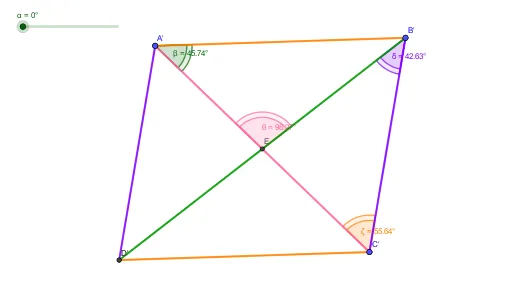
This example demonstrates rotating a parallelogram about its center. The key mathematical concepts include geometric transformation, central symmetry, and coordinate geometry. Construction involves using GeoGebra commands such as Midpoint, Rotate, Segment, and Angle. Suitable for middle or high school mathematics to understand geometric transformations and coordinate system applications.
GeoGebra Commands & Parameters
Midpoint(A, C) → ERotate(A, (-α), E) → A'Rotate(B, (-α), E) → B'Rotate(C, (-α), E) → C'Rotate(D, (-α), E) → D'Segment(A, B) → fSegment(A', B') → gSegment(B, C) → hSegment(B', C') → iSegment(C, D) → jSegment(C', D') → kSegment(D, A) → lSegment(D', A') → mSegment(B, D) → nSegment(B', D') → pSegment(A, C) → qSegment(A', C') → rSegment(A, E) → sSegment(A', E) → tSegment(B, E) → aSegment(B', E) → bSegment(C, E) → cSegment(C', E) → dSegment(D, E) → eSegment(D', E) → f_1Angle(E, A, B) → βAngle(E, A', B') → γAngle(E, B, C) → δAngle(E, B', C') → εAngle(B, C, E) → ζAngle(B', C', E) → ηAngle(B, E, A) → θAngle(B', E, A') → ι
AI Drawing Prompt Reference
Draw a parallelogram and rotate it around its center. First, mark the midpoints of the opposite sides of the parallelogram. Then, rotate the parallelogram around the center by a certain angle. Connect the corresponding vertices before and after rotation to form a new parallelogram. Finally, label the angles of rotation and the segments from the center to each vertex to illustrate geometric transformation, central symmetry, and coordinate geometry.
The prompt above was compiled from the original drawing commands and is for reference only.