
Measuring a Water Tower with the Power of a Point Theorem
Loading the math board and drawing, please wait…
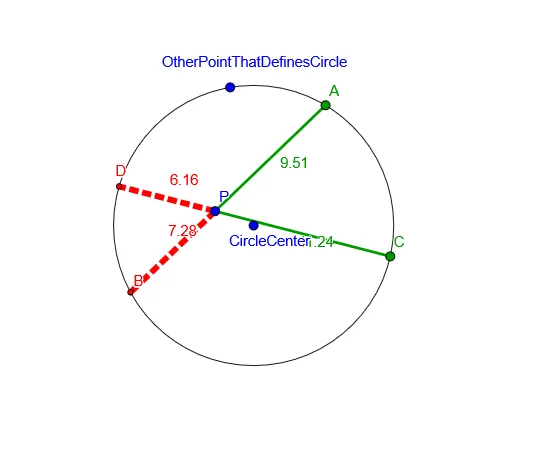
① This example demonstrates how to use the Power of a Point theorem through geometric construction to measure the height of a water tower. ② The core mathematical concepts include the Power of a Point theorem, properties of circles, relationships between secants and tangents, and solving related quadratic equations. ③ The construction employs GeoGebra commands such as Circle, Point, Line, Intersect, and Segment to create objects like CircleCenter, OtherPointThatDefinesCircle, intersection points, and text objects for displaying results. ④ It is suitable for high school or first-year university mathematics courses, particularly in geometry, analytic geometry, or applied mathematics, helping students see how abstract theorems can be applied in practical measurement scenarios.
GeoGebra Commands & Parameters
Circle(CircleCenter, OtherPointThatDefinesCircle) → cPoint(c) → ALine(P, A) → aPoint(c) → CLine(P, C) → bIntersect(c, a, 2) → BIntersect(c, b, 2) → DSegment(P, A) → hSegment(P, B) → iSegment(P, C) → jSegment(P, D) → k
AI Drawing Prompt Reference
Draw a circle in the plane using a specified center and one point on the circle. From the same center, construct two different lines that each pass through the center and intersect the circle (one through the given circle point, the other through another point that defines the second line). Mark the intersection points of the first line with the circle as two points, and similarly mark the two intersection points of the second line with the circle. Connect the circle center to each of these four intersection points with segments so the figure includes the circle, the two secant lines, the four circle-intersection points, and the four radius-like segments.
The prompt above was compiled from the original drawing commands and is for reference only.