
Screw Transformation Demo
Loading the math board and drawing, please wait…
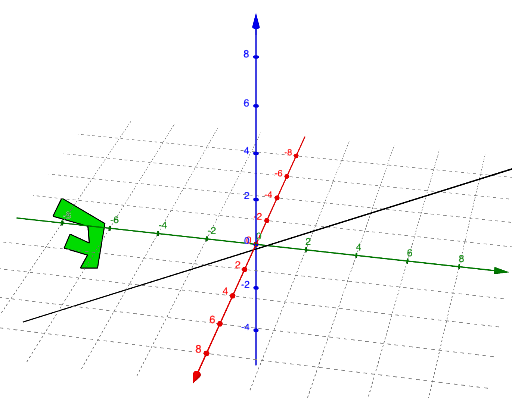
This example demonstrates the geometric behavior of screw transformations in 3D space, generating helical trajectories through combined rotations and translations; core math concepts include geometric transformations, translation, rotation, orthogonal planes, polygon constructions, sequences, etc.; construction highlights from the summary involve commands/objects like Line, Point, Translate, OrthogonalPlane, PointIn, Polygon, Rotate, PolyLine; suitable for high school students and math enthusiasts to explore spatial geometric transformations and parametric constructions, ideal for solid geometry education and exploration.
GeoGebra Commands & Parameters
Line(A, B) → fPoint(f) → CTranslate(C, Vector[(n * (B - A))]) → C'OrthogonalPlane(C', f) → pPointIn(p) → DPointIn(p) → EPointIn(p) → FPointIn(p) → GPointIn(p) → HPointIn(p) → IPointIn(p) → JPointIn(p) → KPointIn(p) → LPointIn(p) → MPolygon(D, E, F, G, H, I, J, K, L, M) → poly1, d, m, e, f_1, g, h, i, j, k, lRotate(poly1, ((n * 2) * π), f) → poly1'PolyLine(D, E, D, F, G, H, I, J, K, L, M) → qRotate(D, ((n * 2) * π), f) → D'Rotate(E, ((n * 2) * π), f) → E'Rotate(F, ((n * 2) * π), f) → F'Rotate(G, ((n * 2) * π), f) → G'Rotate(H, ((n * 2) * π), f) → H'Rotate(I, ((n * 2) * π), f) → I'Rotate(J, ((n * 2) * π), f) → J'Rotate(K, ((n * 2) * π), f) → K'Rotate(L, ((n * 2) * π), f) → L'Rotate(M, ((n * 2) * π), f) → M'Rotate(D, ((n * 2) * π), f) → D'_{1}PolyLine(D', E', D'_{1}, F', G', H', I', J', K', L', M') → q'
AI Drawing Prompt Reference
Create a 3D scene with a given line and use it to define a translation direction. Translate a point on the line along the direction proportional to the segment between the two defining points, obtaining a new point. Construct the plane orthogonal to the original line through this translated point, then select several points lying on that plane. Connect these points in order to form a polygon. Rotate the polygon around the original line by an integer multiple of 2π, and rotate each of the plane points by the same rotation about the same axis. Finally, draw a polyline through the rotated points to visualize a helical-like trajectory generated by the combined rotation and translation setup.
The prompt above was compiled from the original drawing commands and is for reference only.