
Rotational Matrix (Centre of Rotation at C)
Loading the math board and drawing, please wait…
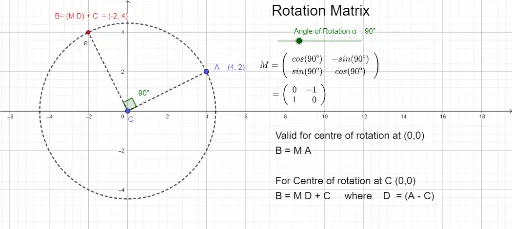
This example demonstrates how rotation matrix operations produce rotational transformations. It involves core math concepts like matrices, rotation, trigonometric functions, and complex numbers. Constructed using GeoGebra commands such as Circle, Segment, and Angle to create objects like center C, angle α, vectors b, c, a, d, and the rotation matrix M along with its transformation effects. Suitable for high school and above students learning linear algebra and transformations.
GeoGebra Commands & Parameters
Circle(C, A) → eSegment(A, C) → fSegment(C, B) → gAngle(A, C, B) → β
AI Drawing Prompt Reference
Draw a circle e centered at point C, a line segment f connecting points A and C, and a line segment g connecting points C and B. Also, create angle β between points A, C, and B. Use matrix operations to construct the rotation matrix M and observe its transformation effects on vectors b, c, a, and d.
The prompt above was compiled from the original drawing commands and is for reference only.