
Grouped Data as Individual Values and as a Frequency Histogram
Loading the math board and drawing, please wait…
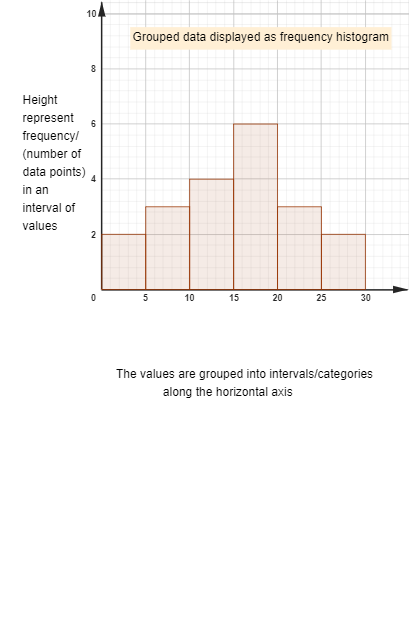
This example lets students compare three representations of the same grouped dataset, helping them understand how grouped intervals translate into a frequency distribution. It focuses on the concepts of grouped data, frequency (how many observations fall into each class), class boundaries (lower/upper limits), and the class mid-value. Construction highlights include generating/organizing data with Sequence, counting and ordering with Length and Sort, visualizing individual values with DotPlot, building class cells and eliminating duplicates using Cell and Unique, and generating the frequency histogram with Histogram. The setup also uses RotateText to improve readability and creates key objects such as interval bounds and the mid-value to link each bar to its corresponding interval. Suitable for middle to high school statistics lessons and for classroom demonstrations of data representation.
GeoGebra Commands & Parameters
Sequence(j, j, 1, 7, 2) → l1fSequence(i, i, 2, 8, 2) → l1Length(l1) → l1lengthSort(Flatten[Sequence[Sequence[Element[l1, k], j, 1, Element[l1f, k]], k, 1, l1length]]) → l1allsortedDotPlot(l1allsorted) → l4Sequence(Polygon[(i - 0.5, 0), (i + 0.5, 0), (i + 0.5, Element[l1allsorted, i]), (i - 0.5, Element[l1allsorted, i])], i, 1, Length[l1allsorted], 1) → l1sortedviewIndividualCell(2, 1) → aLength(lmidvalue) → lgroupedlengthSort(Flatten[Sequence[Sequence[Element[lmidvalue, k], j, 1, Element[lfrequency, k]], k, 1, lgroupedlength]]) → l3Sequence(Polygon[(i - 0.5, 0), (i + 0.5, 0), (i + 0.5, Element[l3, i]), (i - 0.5, Element[l3, i])], i, 1, Length[l3], 1) → lgroupedviewIndividualSequence(Sum[lfrequency, i], i, 1, lgroupedlength) → l5Sequence(Text[Element[lmidvalue, i], If[i < 2, (0.5, Element[lmidvalue, i] + 0.75), (Element[l5, i - 1] + 0.5, Element[lmidvalue, i] + 0.75)]], i, 1, lgroupedlength, 1) → l2Unique(Join[{llower, lupper}]) → lclassbdyHistogram(lclassbdy, lfrequency) → bSequence(Text[i, (i - 0.25, -1.5)], i, 1, Sum[lfrequency], 1) → l6RotateText(text4, pi / 2) → text5
AI Drawing Prompt Reference
Create a frequency histogram and individual value dot plot for grouped data. First, generate and sort individual values, then display them with a dot plot. Next, calculate the boundaries and mid-values for each group, and create a frequency histogram. Finally, add labels for the mid-values of each group and rotate the text for better readability.
The prompt above was compiled from the original drawing commands and is for reference only.