
Rotation Transformation Demo
Loading the math board and drawing, please wait…
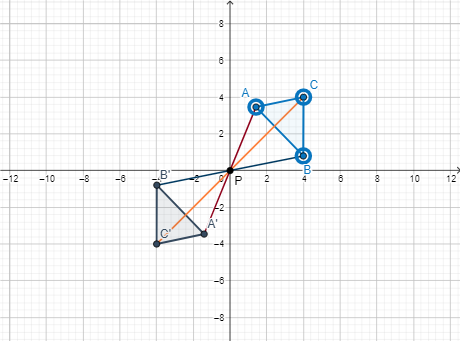
This example demonstrates the transformation of a polygon after rotation, involving core math concepts like rotation, angle, polygon construction, and coordinate geometry. It uses commands such as Polygon, Intersect, Rotate, Segment, and Angle in GeoGebra for construction, suitable for high school students learning geometric transformations and analytical geometry.
GeoGebra Commands & Parameters
Polygon(A, B, C) → poly1, c, a, bIntersect(xAxis, yAxis) → PRotate(A, α, P) → A'Rotate(B, α, P) → B'Rotate(C, α, P) → C'Polygon(A', B', C') → poly1', c', a', b'Segment(A', P) → fSegment(P, A) → gAngle(A, P, A') → βSegment(B', P) → hSegment(P, B) → iSegment(C', P) → jSegment(P, C) → kAngle(B, P, B') → γAngle(C, P, C') → δ
AI Drawing Prompt Reference
Draw a triangle ABC, then rotate it 90 degrees around point P to form a new triangle A'B'C'. Next, draw line segments from A' to P, P to A, B' to P, P to B, C' to P, and P to C, and measure the angles from A to P to A', B to P to B', and C to P to C'.
The prompt above was compiled from the original drawing commands and is for reference only.