
Rotation and Congruence: Dynamic Geometry Exploration Q2
Loading the math board and drawing, please wait…
In collections
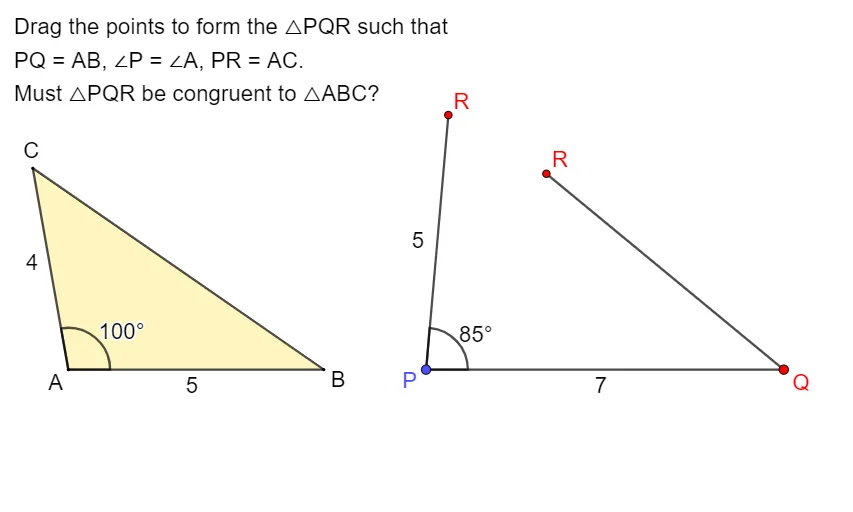
Exploring the Conditions for Congruence of 2 Triangles
①This GeoGebra example dynamically demonstrates rotation, congruence, random experiments, and special points, showing the correspondence between original and rotated figures. ②Core math concepts include congruence, rotation, random experiments, special points (e.g., centroid, incenter), and properties of vectors and polygons. ③Construction highlights: uses commands such as Vector, Sequence, DynamicCoordinates, Point, Rotate, Segment, Polygon, If, and Angle; constructs multiple points (A, B, C, D, E, F, G), vectors (u, v and copies), rotated images (e.g., C'), closed polygons (closed1), and text labels (text1), with interactive sliders or dynamic coordinates. ④Suitable for middle/high school geometry lessons, math labs, or self-study to explore rotation-congruence properties, random point distributions, and dynamic construction techniques, as well as to investigate how special points change under rotation.
GeoGebra Commands & Parameters
Vector(A, C1) → uSequence((x(A) + (round(Length[u]) * cos(t°)), y(A) + (round(Length[u]) * sin(t°))), t, 0, 355, 5) → VPointsDynamicCoordinates(C1, x(ClosestPoint[VPoints, C1]), y(ClosestPoint[VPoints, C1])) → CPoint(Sequence[A + (i, 0), i, 1, 20, 1]) → BVector(B, C2) → vRotate(D + (4, 0), 100°, D) → FSegment(F, D) → kSegment(E, F) → jSegment(A, C) → fSegment(A, B) → gDynamicCoordinates(C2, If[Distance[C2, C] < d, x(C), x(C2)], If[Distance[C2, C] < d, y(C), y(C2)]) → C'Sequence(B + (i * UnitVector[Segment[B, C2]]), i, 1, 20, 1) → UPointsSegment(C', B) → hPolygon({A, B, C}) → t1If(Distance[C', C] < d, true, false) → closed1Segment(D, E) → iPolygon(D, E, F) → t3, l, m, nAngle(E, D, F) → αAngle(B, A, C) → β
AI Drawing Prompt Reference
Draw a dynamic geometric figure demonstrating rotation and congruence. Include a random vector and a point, generate a series of points using the vector, and identify the closest point to the rotation center. Construct a polygon centered around this point and display its rotated image. Add multiple points and vectors, build several line segments and polygons, and label key angles such as the interior angles of the polygon and the rotation angle to explore properties of rotation, congruence, and special points (e.g., centroid, incenter).
The prompt above was compiled from the original drawing commands and is for reference only.