
Cube with Trigonometric Functions and Vector Rotation
Loading the math board and drawing, please wait…
In collections
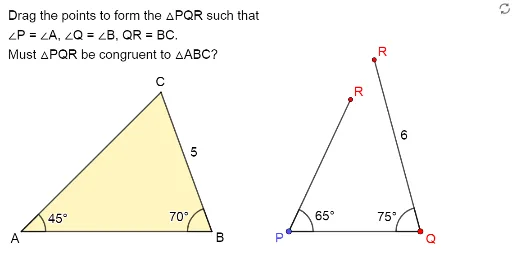
Exploring the Conditions for Congruence of 2 Triangles
This GeoGebra example demonstrates a comprehensive geometric construction involving a cube, vector rotations, trigonometric function ratios, and dynamic points. It visualizes how rotating vectors in 3D space can generate point sets related to angles, allowing observation of sine and cosine ratio changes. Core mathematical concepts include vector operations, rotation transformations, trigonometric functions (sine, cosine), and proportional relationships. The construction uses commands such as Vector, Rotate, Union, Point, DynamicCoordinates, Angle, Sequence, Segment, Polygon, and If, creating numerous objects like C1, A, u, D, E, F, G, d, H, VPoints, l1, B, C, β, C2, v, UPoints, C', δ, h, k, j, uCopy, f, g, vCopy, t1, closed1, text1, i, t3, l, m, n, α, γ, and reached, which together form a complex network of geometric relationships. Suitable for high school or early college students to understand the integration of vectors and trigonometry, and also useful for teachers creating dynamic geometry lessons.
GeoGebra Commands & Parameters
Vector(A, C1) → uRotate(E - (5, 0), (-(70°)), E) → FUnion(Sequence[(x(A) + (Length[u] * cos(t°)), y(A) + (Length[u] * sin(t°))), t, 0, 355, 5], {G}) → VPointsPoint(Ray[A + (1, 0), A + (2, 0)]) → BDynamicCoordinates(C1, x(ClosestPoint[VPoints, C1]), y(ClosestPoint[VPoints, C1])) → CAngle(B, A, C) → βVector(B, C2) → vSequence((x(B) + (round(Length[v]) * cos(t°)), y(B) + (round(Length[v]) * sin(t°))), t, 0, 355, 5) → UPointsDynamicCoordinates(C2, x(ClosestPoint[UPoints, C2]), y(ClosestPoint[UPoints, C2])) → C'Angle(C', B, A) → δSegment(C', B) → hSegment(F, D) → kSegment(E, F) → jSegment(A, C) → fSegment(A, B) → gPolygon({A, B, C'}) → t1If(Distance[C, C'] < d, true, false) → closed1Segment(D, E) → iPolygon(D, E, F) → t3, l, m, nAngle(E, D, F) → αAngle(F, E, D) → γIf(B ≟ H, true, false) → reached
AI Drawing Prompt Reference
Draw a cube and rotate vector u around point A to generate point set VPoints. Then draw points B and C, calculate angle β. Next, rotate vector v to generate point set UPoints and calculate angle δ. Connect points C', B, F, D, E, F, A, C, A, B to form polygons t1, t3, l, m, n. Finally, calculate angles α and γ, and check if point B equals point H.
The prompt above was compiled from the original drawing commands and is for reference only.