
Rotating Cube
Loading the math board and drawing, please wait…
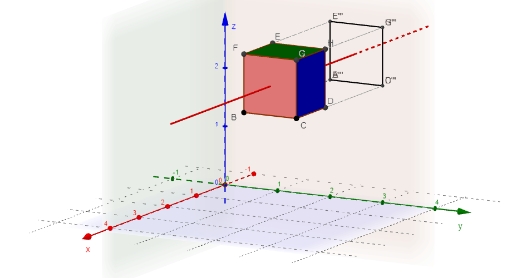
This example demonstrates a rotatable cube and its geometric properties, involving core math concepts like solid geometry, rotation, polygons, piecewise-defined functions, and probability & statistics. It is constructed using GeoGebra commands: Cube, Segment, Line; objects include angles α, β, γ, sliders w_1, w_2, w_3 for rotation control, vertices A, B, C..., faces FlächeABCD..., edges KanteAD...; suitable for high school and above students to explore spatial geometry, probability distributions, and dynamic geometry visualization.
GeoGebra Commands & Parameters
Cube(A, B, C) → a, D, FlächeCDHG, FlächeEFGH, KanteAD, KanteAB, KanteBC, KanteCD, KanteAE, KanteDH, KanteEH, KanteEF, E, KanteBF, KanteFG, KanteCG, KanteGH, F, G, H, FlächeABCD, FlächeADHE, FlächeABFE, FlächeBCGFSegment(A', B') → fSegment(B', C') → gSegment(C', D') → hSegment(D', A') → iSegment(A', E') → jSegment(B', F') → kSegment(C', G') → lSegment(D', H') → mSegment(E', F') → nSegment(F', G') → pSegment(G', H') → qSegment(H', E') → rSegment(A''', B''') → sSegment(B''', C''') → tSegment(C''', D''') → bSegment(D''', A''') → cSegment(A''', E''') → dSegment(B''', F''') → eSegment(C''', G''') → f_1Segment(D''', H''') → h_1Segment(E''', F''') → i_1Segment(F''', G''') → j_1Segment(G''', H''') → k_1Segment(H''', E''') → l_1Segment(A'', B'') → m_1Segment(B'', C'') → n_1Segment(C'', D'') → p_1Segment(D'', A'') → q_1Segment(B'', F'') → r_1Segment(A'', E'') → s_1Segment(C'', G'') → t_1Segment(D'', H'') → a_1Segment(H'', G'') → b_1Segment(E'', F'') → c_1Segment(G'', F'') → d_1Segment(H'', E'') → e_1Segment(A, A') → f_2Segment(B, B') → h_2Segment(C, C') → i_2Segment(D, D') → j_2Segment(E, E') → k_2Segment(F, F') → l_2Segment(H, H') → m_2Segment(G, G') → n_2Segment(A, A''') → p_2Segment(D, D''') → s_2Segment(F, F''') → t_2Segment(E, E''') → a_2Segment(G, G''') → b_2Segment(A, A'') → c_2Segment(D, D'') → f_3Segment(E, E'') → h_3Segment(H, H'') → i_3Segment(F, F'') → j_3Segment(G, G'') → k_3Segment(H, H''') → q_2Segment(C, C'') → r_2Segment(C, C''') → d_2Segment(B, B''') → e_2Segment(B, B'') → l_3Line(M, xAxis) → g_1Line(M, yAxis) → g_2Line(M, zAxis) → g_3
AI Drawing Prompt Reference
Draw a rotatable cube demonstrating its 3D geometric properties. Start with a base cube having eight vertices, six faces, and twelve edges. Then, create three rotated copies of the cube positioned around the original, connecting corresponding vertices with line segments to show rotation paths. Add three sliders to control rotation angles around the x, y, and z axes, allowing real-time rotation. Highlight the edges of each copy with distinct colors while keeping the original cube's outline visible, to observe spatial changes during rotation.
The prompt above was compiled from the original drawing commands and is for reference only.