
Reflection in a Conic
Loading the math board and drawing, please wait…
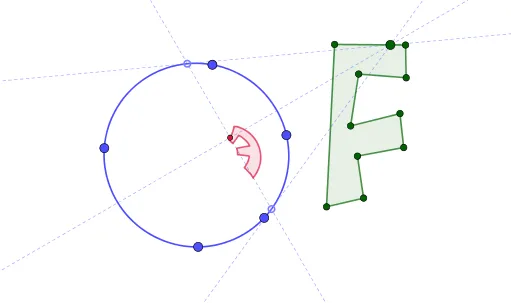
This example demonstrates the reflection of light on a conic section, illustrating key mathematical concepts like conic sections, reflection laws, and analytical geometry. It utilizes GeoGebra commands such as Polygon, Conic, Point, Polar, Tangent, OrthogonalLine, Intersect, and Locus to construct the geometric representation, making it suitable for high school and advanced students studying properties of conic curves and applications in physical optics.
GeoGebra Commands & Parameters
Polygon(L, M, N, O, P, Q, R, S, T, U) → poly2, l_1, u, m_1, n, o, p, q, r, s, tConic(A, B, C, D, E) → cPoint(poly2) → FPolar(F, c) → fTangent(F, c) → g, hOrthogonalLine(F, f) → iIntersect(f, i) → GLocus(G, F) → loc1Intersect(g, f) → HIntersect(f, h) → ICircle(J, 3) → d
AI Drawing Prompt Reference
Draw a figure consisting of a decagon and an ellipse to demonstrate the reflection of light on the ellipse. Start by drawing a decagon and an ellipse. From a vertex of the decagon, draw a ray pointing towards the ellipse, then find the tangent and perpendicular line to the ray at the point where it intersects the ellipse. Next, locate the intersection of the ray and the perpendicular line, and draw the locus of this point as the ray moves. Finally, add a circle with a radius of 3 on the ellipse to complete the illustration.
The prompt above was compiled from the original drawing commands and is for reference only.