
Reflecting about Planes: Introduction
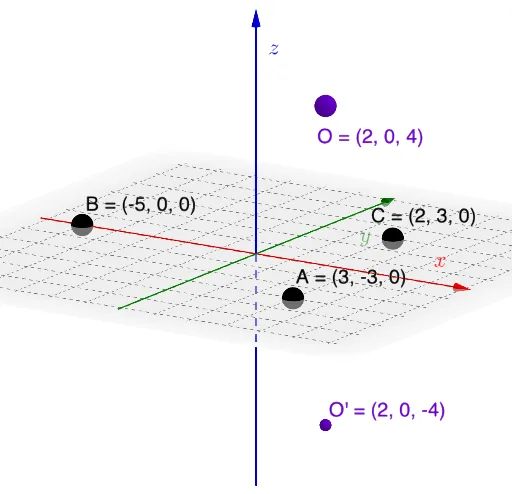
Loading the math board and drawing, please wait…
In collections
Reflecting about Planes
This example demonstrates geometric transformations and symmetry in planes. Key mathematical concepts include rotation, centroid or barycenter, prism, difference and slope, intersection. Construction involves GeoGebra commands such as Plane, Mirror, Line, Intersect, OrthogonalLine, Dilate, Segment, Point, Rotate, Angle. Suitable for middle or high school mathematics education to understand geometric transformations and properties.
GeoGebra Commands & Parameters
Plane(A, B, C) → pMirror(O, p) → O'Line(O, O') → fIntersect(p, f) → DOrthogonalLine(D, Vector[D, O], Vector[D, B]) → jPlane(f, j) → qDilate(O, If[0 < SlideMe ≤ 1, 1 - SlideMe, 0], D) → O'_{1}Segment(O, O'_{1}) → gDilate(D, If[1 < SlideMe ≤ 2, 2 - SlideMe, 0], O') → D'Segment(D, D') → hOrthogonalLine(D, Vector[O, O'], xOyPlane) → iPoint(i) → ERotate(O, If[2 < SlideMe ≤ 3, ((SlideMe - 2) * π), π], D, q) → O'_{2}Rotate(O'_{1}, If[2 < SlideMe ≤ 3, ((SlideMe - 2) * π), π], D, q) → FSegment(O'_{2}, F) → g'Point(j) → GAngle(G, D, O) → α
AI Drawing Prompt Reference
Draw a geometric transformation and symmetry demonstration involving planes, lines, and rotations. Start by constructing a plane and a mirror reflection, then find intersections and perpendicular lines. Create a second plane and use dilation and rotation to show the transformation process. Highlight key points and angles to illustrate geometric properties, resulting in a complete illustration of symmetry and transformations.
The prompt above was compiled from the original drawing commands and is for reference only.