
Rectangle Construction Exercise: Using Lines and Perpendiculars
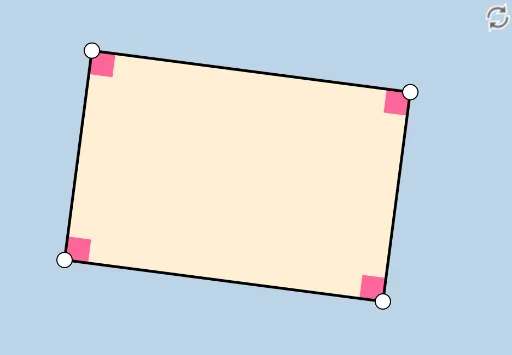
Loading the math board and drawing, please wait…
In collections
Congruence (CO) Cluster
Congruence (Vol 2)
Geometry (Congruence) Volume 2
CCSS High School: Geometry (Congruence) Volume 2
CCSS High School: Geometry (Congruence) Volume 2
CCSS High School: Geometry (Congruence) Volume 2
CCSS High School: Geometry (Congruence) Volume 2
CCSS High School: Geometry (Congruence) Volume 2
CCSS High School: Geometry (Congruence) Volume 2
Constructions (Compass & Straightedge)
Constructions (Compass & Straightedge)
Constructions (Compass & Straightedge)
Constructions (Compass & Straightedge)
① This example demonstrates how to construct a rectangle step by step using given lines and points, with perpendiculars and intersections, and then label its sides and angles. ② Core mathematical concepts include the definition of a rectangle (four right angles, opposite sides parallel and equal), the positional relationship between lines and perpendiculars, and the logical sequence in geometric construction. ③ Construction highlights: from the summary, commands such as Line, OrthogonalLine, Point, Intersect, Polygon, Segment, and Angle are used, with objects A, B, f, g, D, h, i, E, poly1, segments a, b, e, d, and angles α, β, γ, δ, showing a progression from basic elements to a complete figure. ④ Suitable for middle school geometry lessons or introductory geometric construction practice, helping students understand rectangle properties and master GeoGebra's basic construction tools.
GeoGebra Commands & Parameters
Line(A, B) → fOrthogonalLine(A, f) → gPoint(g) → DLine(D, f) → hLine(B, g) → iIntersect(h, i) → EPolygon(A, B, E, D) → poly1, a, b, e, dSegment(D, E) → jSegment(E, B) → kSegment(B, A) → lSegment(A, D) → mAngle(poly1) → α, β, γ, δ
AI Drawing Prompt Reference
Start by drawing a horizontal line as the base, and place two points on it as two adjacent vertices of the rectangle. Through one of these points, construct a perpendicular line to the base, and pick a point on this perpendicular to serve as the third vertex. Then, through this new point, draw a line parallel to the base, and through the other endpoint of the base, draw a line parallel to the first perpendicular. The intersection of these two lines gives the fourth vertex. Connect the four vertices in order to form the rectangle, and label all four sides and four interior angles, each being a right angle.
The prompt above was compiled from the original drawing commands and is for reference only.