
Ratios and Line Segments (v2)
Loading the math board and drawing, please wait…
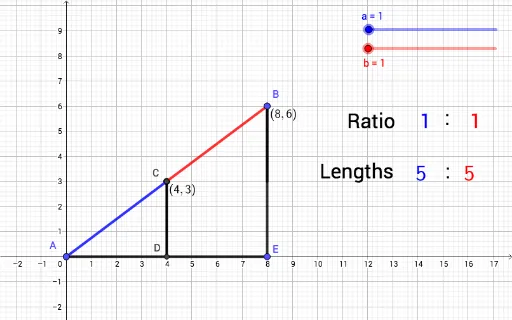
This example demonstrates how to dynamically adjust the ratio between two numbers using a slider in GeoGebra and visualize the resulting ratio on a line segment. Core math concepts include ratios, line segments, number line representation, and continuity. Key GeoGebra commands/objects used are Segment, Line, Intersect, Sequence, FractionText, and OrthogonalLine. Suitable for middle school and above students to understand the relationship between ratios and line segment lengths, and the concept of combining numbers and shapes.
GeoGebra Commands & Parameters
Segment(A, B) → fSegment(E, B) → gSegment(E, A) → hLine(C, h) → lIntersect(l, g) → E_1Segment(C, E_1) → mSegment(E_1, B) → nSegment(A, C) → pSegment(C, B) → qSequence(((n / (a + b) * c), (n / (a + b) * d)), n, 0, a + b, 1) → L_1FractionText(C) → text9FractionText(B) → text10OrthogonalLine(C, h) → rIntersect(r, h) → DSegment(C, D) → s