
Radius and Volume of a Circle
Loading the math board and drawing, please wait…
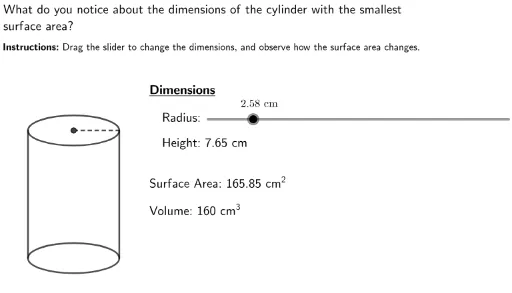
This example demonstrates the relationship between the radius and volume of a circle. Key mathematical concepts include the properties of a circle and volume calculation. Using GeoGebra commands such as Ellipse, Segment, and Min, the example dynamically shows how changes in the radius affect the area of the circle and the volume of the cylinder. Suitable for high school mathematics education and learning.
GeoGebra Commands & Parameters
Min(0.1, Height / 100) → OutsideEllipse(CentPt1, CentPt2, OutsideBot) → cEllipse(TopCentPt1, TopCentPt2, OutsideTop) → dSegment(LeftTop, LeftBot) → LeftLineSegment(OutsideBot, OutsideTop) → RightLineSegment(TopCentPt, OutsideTop) → RadiusSegLaTeX(Radius + "\ cm") → RadiusTextLaTeX(Height + "\ cm") → HeightTextLaTeX("Radius\text{:}") → RadiusWordsLaTeX("Surface\ Area\text{:}\ " + SurfaceArea + "\ cm^2") → SATextLaTeX("Volume\text{:}\ 160\ cm^3") → VTextLaTeX(" What\ do\ you\ notice\ about\ the\ dimensions\ of\ the\ cylinder\ with\ the\ smallest\\ surface\ area?") → InstructionsLaTeX("\textbf{Instructions\text{:}}\ Drag\ the\ slider\ to\ change\ the\ dimensions,\, and\ observe\ how\ the\ surface\ area\ changes.") → Instructions2LaTeX("Height\text{:}\ " + RoundHeight + "\ cm") → HTextLaTeX("\underline{Dimensions}") → DimensionsLaTeX("\textbf{" + Dimensions + "}\\ \ \\\ \\\ \ \ " + RadiusWords + "\\ \ \\ \ \\ \ \ \ " + HText + "\\ \ \\ \ \\ \ \\ \ \\" + SAText + "\\ \ \\ \ \\" + VText) → Text
AI Drawing Prompt Reference
Draw a circle and a cylinder to demonstrate the relationship between radius and volume. Adjust the cylinder's height and base radius dynamically using a slider. Label the base radius and height, and display the calculated surface area and volume of the cylinder. Pay special attention to the dimensions of the cylinder with the smallest surface area.
The prompt above was compiled from the original drawing commands and is for reference only.