
3D Random Walk
Loading the math board and drawing, please wait…
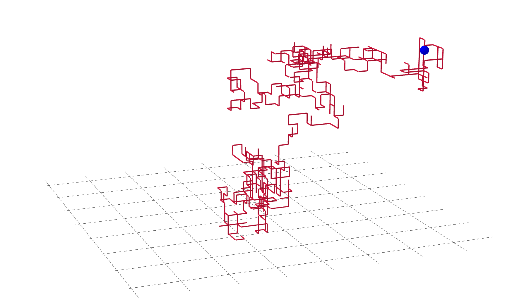
This example demonstrates the generation and dynamic evolution of random walk trajectories in three-dimensional space. It involves core mathematical concepts such as Probability & Statistics, Stochastic Processes, and Vector Calculus in trajectory analysis. Key GeoGebra commands and objects used include Random for generating random steps, PolyLine for trajectory plotting, and interactive elements like n, a, A, P, f, button1, button2, text1 for parameter control and visualization. Suitable for high school students and math enthusiasts to explore the connection between random processes and spatial geometry, serving as an educational aid in probability statistics and solid geometry instruction.
GeoGebra Commands & Parameters
Random(1, 8) → aPolyLine(P) → f
AI Drawing Prompt Reference
Draw a 3D random walk trajectory. First, generate a random number between 1 and 8 as the step length, then use these step lengths to plot a 3D trajectory. Adjust the step length and number of steps to observe changes in the trajectory.
The prompt above was compiled from the original drawing commands and is for reference only.