
Cylindrical Region Demonstration
Loading the math board and drawing, please wait…
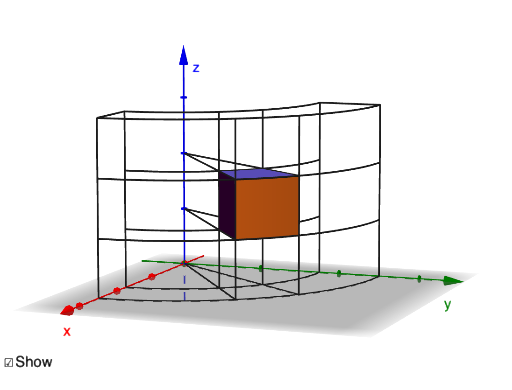
This example demonstrates how to draw a cylindrical region using GeoGebra. It involves core mathematical concepts such as calculus, expected value, right triangles, arithmetic operations, boxplots, and statistical characteristics. The construction highlights commands like Surface, Polygon, CircleArc, Translate, Segment, and Rotate, along with objects like dθ, button1, max, rmin, rmax, min, S1, S2, S3, S4, P1, P3, P2, P4, P5, P6, P7, P8, Pol1, p1, p2, p6, p5, f, Pol2, p4, p8, p7, p3, g, Q1, Q2, Q3, Q4, O, A1, A2, u, A3, A4. It is suitable for high school and above students studying calculus and solid geometry.
GeoGebra Commands & Parameters
Surface((u * cos(v)), (u * sin(v)), 1, u, rmin, rmax, v, min, max) → S1Surface((u * cos(v)), (u * sin(v)), 2, u, rmin, rmax, v, min, max) → S2Surface((rmax * cos(u)), (rmax * sin(u)), v, u, min, max, v, 1, 2) → S3Surface((rmin * cos(u)), (rmin * sin(u)), v, u, min, max, v, 1, 2) → S4Polygon(P1, P2, P6, P5, P1) → Pol1, p1, p2, p6, p5, fPolygon(P4, P8, P7, P3, P4) → Pol2, p4, p8, p7, p3, gCircleArc(O, Q1, Q2, xOyPlane) → A1CircleArc(O, Q3, Q4, xOyPlane) → A2Translate(A1, u) → A3Translate(A2, u) → A4Translate(A1, v) → A5Translate(A2, v) → A6Translate(A1, w) → A7Translate(A2, w) → A8Segment(P6, (0, 0, z(P6))) → L1Segment(P7, (0, 0, z(P7))) → L2Segment(P2, (0, 0, z(P2))) → L3Segment(P3, (0, 0, z(P3))) → L4Segment(Q1, (x(Q1), 0, 3)) → L5Segment(Q2, (0, y(Q2), 3)) → L6Segment(Q3, (x(Q3), 0, 3)) → L7Segment(Q4, (0, y(Q4), 3)) → L8Segment((x(Q1), 0, 3), (x(Q3), 0, 3)) → L9Segment((0, y(Q2), 3), (0, y(Q4), 3)) → L10Segment(O, (x(P6), y(P6), 0)) → B1Segment(O, (x(P7), y(P7), 0)) → B2Rotate(L5, min, zAxis) → T1Rotate(L5, max, zAxis) → T2Rotate(L7, min, zAxis) → T3Rotate(L7, max, zAxis) → T4
AI Drawing Prompt Reference
Draw a cylindrical region with four semicircular arcs and four rectangular faces. First, draw two cylindrical surfaces S1 and S2 with radii rmin and rmax, then draw two cylindrical surfaces S3 and S4 with radii rmin and rmax. Next, draw four rectangular faces Pol1 and Pol2, and four arcs A1 and A2. Translate A1 and A2 along the u, v, and w axes to get A3, A4, A5, A6, A7, and A8. Draw four line segments L1 to L10, and two line segments B1 and B2. Finally, rotate L5 and L7 around the z-axis to get T1, T2, T3, and T4.
The prompt above was compiled from the original drawing commands and is for reference only.