
Quadrilateral and Locus Demonstration
Loading the math board and drawing, please wait…
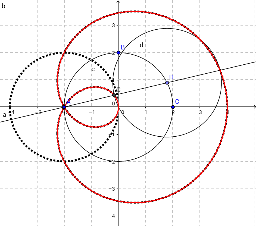
This example demonstrates how to construct a quadrilateral and its locus to illustrate dynamic geometric transformations. Key math concepts include coordinate geometry, locus equations, and polygon area calculations. The construction uses GeoGebra commands and objects such as Circle, Point, Line, Intersect, Locus, and LocusEquation as outlined in the summary. It is suitable for high school students to explore the properties and variations of complex geometric figures, aiding both teaching and inquiry-based learning.
GeoGebra Commands & Parameters
Circle(A, B, C) → cPoint(c) → DLine(A, D) → aCircle(D, Segment[E, F]) → dIntersect(d, a, 2) → GLocus(G, D) → loc1LocusEquation(G, D) → b