
Morse Code Visualizer/Decoder: Geometric Segments for Dots and Dashes
Loading the math board and drawing, please wait…
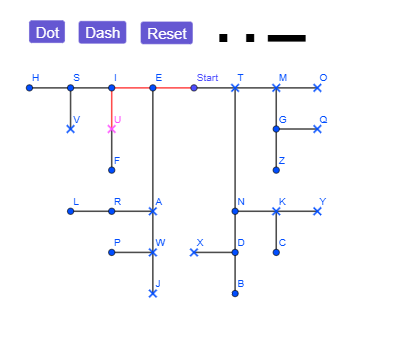
This example demonstrates how a Morse code dot/dash sequence can be visualized as structured geometric segments, and then decoded back into the corresponding letters through an interactive mapping. The mathematical ideas involved are discrete sequence-to-graphics encoding, piecewise segment construction, and rule-based symbol matching using the standard Morse table. From the construction summary, the key GeoGebra step is using the command “Segment, First” to build the segment primitives that represent dots and dashes. The interface is organized via objects such as button1/button2/button3 and control elements like Start, along with letter targets (E, I, S, H, V, U, F, A, R, L, W, J, P, T, M, O, G, Q, Z, N, K, Y, C, D, X, B). Additional objects (f, g, h, i, j, k, l, m, n, p) support storing or updating the constructed paths/outputs during the visualization and decoding workflow. Suitable for secondary-school through undergraduate learners, especially for lessons on discrete mathematics, encoding concepts, and interactive geometric construction in GeoGebra.
GeoGebra Commands & Parameters
Segment(E, I) → fSegment(I, S) → gSegment(S, H) → hSegment(S, V) → iSegment(Start, E) → jSegment(Start, T) → kSegment(T, M) → lSegment(M, O) → mSegment(M, G) → nSegment(G, Q) → pSegment(G, Z) → qSegment(T, N) → rSegment(N, K) → sSegment(K, Y) → tSegment(K, C) → aSegment(N, D) → bSegment(D, X) → cSegment(D, B) → dSegment(I, U) → eSegment(U, F) → f_1Segment(E, A) → g_1Segment(A, R) → h_1Segment(R, L) → i_1Segment(A, W) → k_1Segment(W, P) → j_1Segment(W, J) → l_1First(morse, 1) → morse1First(morse, 2) → morse2First(morse, 3) → morse3First(morse, 4) → morse4
AI Drawing Prompt Reference
Create a Morse code visualizer that translates dot (short) and dash (long) sequences into geometric line segments, with interactive buttons to decode the segments into corresponding letters (e.g., E, I, S, H). Illustrate the encoding from sequences to graphics and the decoding from graphics to letters, where segment lengths represent the duration of dots or dashes, and letters appear upon button activation.
The prompt above was compiled from the original drawing commands and is for reference only.