
Quadratic Cup: Quadratic Functions and Solid Geometry
Loading the math board and drawing, please wait…
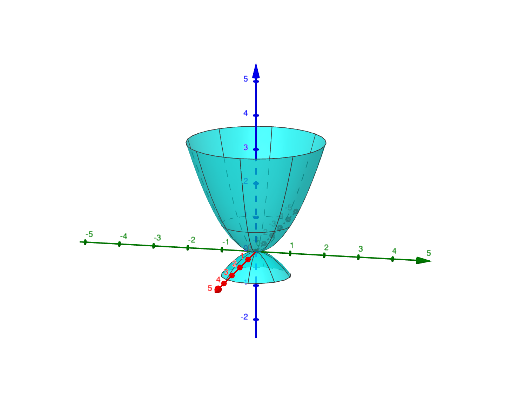
Quadratic Cup demonstrates the integration of quadratic functions with solid geometry using GeoGebra commands. It creates a dynamic quadratic surface model through Surface and Rotate commands. Key mathematical concepts include quadratic functions, solid geometry, and parametric equations. Construction involves objects like n, body, base, f, a, g, b, a', b' to build the surface and rotate it. Suitable for high school students or college students learning about the combination of quadratic functions and geometric transformations, and understanding parametric equations in solid geometry.
GeoGebra Commands & Parameters
Surface(f, 360°, yAxis) → aSurface(g, 360°, yAxis) → bRotate(a, 90°, xAxis) → a'Rotate(b, 90°, xAxis) → b'
AI Drawing Prompt Reference
Create a quadratic “cup” style solid geometry made from two distinct quadratic surfaces. First, construct two surfaces on the same vertical axis direction from the quadratic expressions f and g, each spanning a full 360° sweep in parameter form so they form separate curved regions. Then rotate the first surface by 90° about the x-axis to obtain a rotated copy, and rotate the second surface by 90° about the same x-axis to get another rotated copy. View the result to see how the two quadratic surfaces relate through the 90° rotations.
The prompt above was compiled from the original drawing commands and is for reference only.