
Pythagorean Theorem (Right Triangles) Interactive Demo
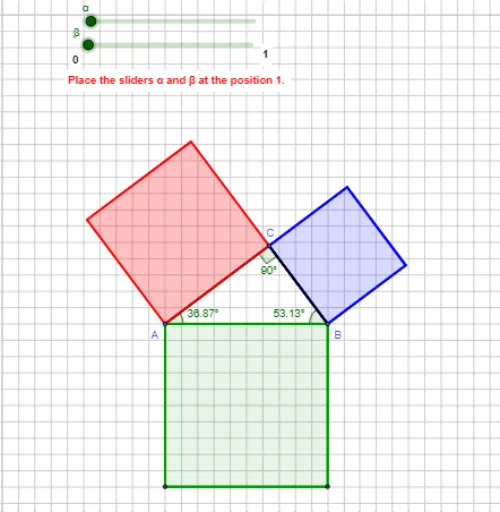
Loading the math board and drawing, please wait…
In collections
Pythagorean Theorem
① This GeoGebra example demonstrates the Pythagorean theorem in a right triangle, showing that the sum of the squares of the two legs equals the square of the hypotenuse through an interactive geometric construction. ② Core mathematical concepts include the Pythagorean theorem, right triangles, area relationships, and algebraic-geometric verification. ③ Construction highlights: using GeoGebra commands such as Circle, Intersect, Segment, Rotate, Angle, Ray, Polygon, Textfield, and If to build the right triangle with attached squares, allowing dynamic input of side lengths and real-time verification; key objects include points A, B, C, segments a, b, c, and multiple text labels. ④ Suitable for middle school geometry classes to explore and prove the Pythagorean theorem, and also useful for high school math labs or introductory analytic geometry activities.
GeoGebra Commands & Parameters
Circle(B, 6) → cCircle(A, 8) → c_1Intersect(c, c_1) → D, E, ,Segment(A, B) → fSegment(A, C) → gRotate(A, (-β), B) → Α'Angle(Α', B, A) → β_1Segment(A, B) → qSegment(B, C) → rAngle(C, B, A) → γRay(B, Α') → sIntersect(c, s) → G,Polygon(G, B, 4) → πολύγ3, t, a_1, b, d, G_1, HSegment(B, C) → eAngle(B, A, C) → δAngle(A, C, B) → εTextfield(empty1) → ΕισΑΒ2Textfield(empty2) → ΕισAC2Textfield(empty3) → ΕισBC2Textfield(empty4) → ΕισBCTextfield(empty5) → ΕισAC2kaiBC2Polygon(B, A, 4) → πολύγ1, h, j, k, h_1, Α, ΒSelectedElement(L) → text5SelectedIndex(L) → vSelectedIndex(L1) → wPoint(c_1) → IRotate(B, ζ, A) → B'Angle(B, A, B') → ηSegment(A, B') → mIntersect(c_1, m) → J,Polygon(A, J, 4) → poly1, n, p, b_1, d_1, K, MTextfield(empty7) → ΕισαΑCTextfield(empty6) → ΕισΑΒIf(ans6 ≟ 10, true, false) → AB1If(ans1 ≟ 100, true, false) → AB2If(ans7 ≟ 8, true, false) → AC1If(ans2 ≟ 64, true, false) → AC2If(ans5 ≟ 100, true, false) → AC2kaiBC2If(ans3 ≟ 36, true, false) → BC2If(ans4 ≟ 6, true, false) → BC1
AI Drawing Prompt Reference
Draw a right triangle with squares on its two legs. Adjust the triangle's sides dynamically to show that the sum of the squares of the legs equals the square of the hypotenuse. Use circles and rotations to construct the square on the hypotenuse, labeling the lengths and areas to verify the Pythagorean theorem.
The prompt above was compiled from the original drawing commands and is for reference only.