
Pyramid Volume vs Base Area Demo
Loading the math board and drawing, please wait…
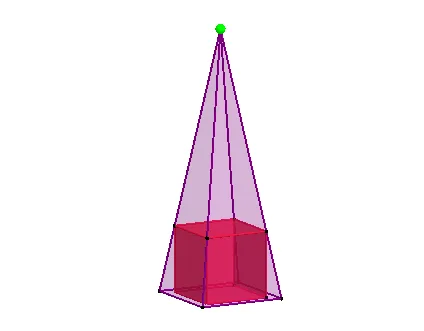
This example demonstrates the relationship between the volume and base area of a pyramid. It visually shows how volume changes with adjustments to the height and base shape, illustrating the volume calculation formula. Key math concepts include solid geometry, volume computation, area formulas, and 3D shape transformations. Constructed using GeoGebra commands like Point, Cube, Line, Intersect, Pyramid, Volume, with objects such as edges and faces defining the geometry. Suitable for high school solid geometry teaching to enhance spatial reasoning and formula understanding.
GeoGebra Commands & Parameters
Point(Circle[(0.5, -0.5, 0), Distance[(-0.5, -0.5, 0), (0.5, -0.5, 0)], Segment[(-0.5, -0.5, 0), (0.5, -0.5, 0)]]) → ACube((-0.5, -0.5, 0), (0.5, -0.5, 0), A) → a, B, faceABFE, faceCDEF, edge2, edge1, edge4, edgeAB, edge3, edgeBF, edgeCF, edgeCD, C, edge5, edgeDE, edgeAE, edgeEF, D, E, F, face1, face3, face2, face4Point(zAxis) → GLine(G, C) → fLine(G, D) → gLine(G, E) → hLine(G, F) → iIntersect(f, xOyPlane) → HIntersect(g, xOyPlane) → IIntersect(h, xOyPlane) → JIntersect(i, xOyPlane) → KPyramid(H, I, J, K, G) → b, faceHIJK, edgeGH, edgeGI, edgeGJ, edgeGK, faceGHI, faceGIJ, faceGJK, faceGHK, edgeHI, edgeIJ, edgeJK, edgeHKVolume(b) → volumebPoint(b) → Pointb
AI Drawing Prompt Reference
Draw a pyramid to demonstrate the relationship between its volume and base area. Start by constructing a cube as a reference, then project lines from the cube's vertices to the base to obtain four points on the base. Connect these four points to the top vertex of the cube to form the pyramid. Calculate and display the volume of the pyramid, visually showing how volume changes with adjustments to the height and base shape, illustrating the volume formula.
The prompt above was compiled from the original drawing commands and is for reference only.