
Pyramid Stacks: Exploring Solid Geometry and Trigonometry
Loading the math board and drawing, please wait…
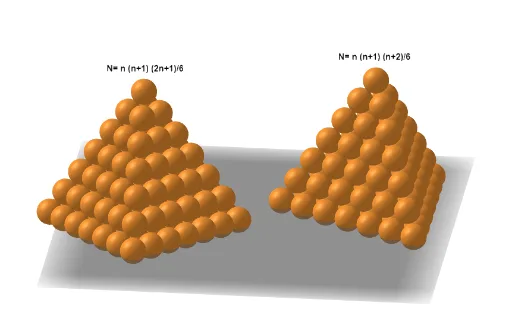
This GeoGebra example demonstrates how to construct a pyramid stack model, showing a three-dimensional structure formed by stacking multiple layers of triangles or quadrilaterals. The core mathematical concepts include pyramid structures in solid geometry, trigonometric relationships between sides and angles, and recursive patterns in sequences. Construction highlights: Commands extracted from the summary include Vector for determining stacking direction and height, Sequence for generating multi-layer stacks, Mirror for creating symmetric structures, Line for drawing edges, and Join for combining elements into a complete pyramid; objects involve Step (step parameter) controlling layer count, Zoom for view adjustment, and points/lines/surfaces like R, O, p, q. This example is suitable for middle school solid geometry teaching, high school trigonometry application demonstrations, and interactive exploration activities to develop students' spatial imagination.
GeoGebra Commands & Parameters
Vector((0, 0, 0), (Zoom / sqrt(2), 0, (-Zoom))) → pVector((0, 0, 0), ((Zoom * cos(120°) / sqrt(2)), (Zoom * sin(120°) / sqrt(2)), (-Zoom))) → qVector((0, 0, 0), ((Zoom * cos(240°) / sqrt(2)), (Zoom * sin(240°) / sqrt(2)), (-Zoom))) → rJoin(Join[Sequence[Sequence[Sequence[E + (i * p) + (j * ((-p) + q)) + (k * ((-q) + r)), k, 0, j], j, 0, i], i, 0, Step]]) → L1Sequence(Sphere[Element[L1, i], R], i, 1, Length[L1]) → l1Vector((0, 0, 0), (Zoom / sqrt(2), 0, (-Zoom))) → uVector((0, 0, 0), ((Zoom * cos(90°) / sqrt(2)), (Zoom * sin(90°) / sqrt(2)), (-Zoom))) → vVector((0, 0, 0), ((Zoom * cos(180°) / sqrt(2)), (Zoom * sin(180°) / sqrt(2)), (-Zoom))) → wVector((0, 0, 0), ((Zoom * cos(270°) / sqrt(2)), (Zoom * sin(270°) / sqrt(2)), (-Zoom))) → aJoin(Join[Sequence[Sequence[Sequence[C + (i * u) + (j * ((-u) + v)) + (k * ((-v) + w)), k, 0, j], j, 0, i], i, 0, Step]]) → l2Line(B, zAxis) → fMirror(l2, f) → l2'Join({l2, l2'}) → l3Sequence(Sphere[Element[l3, i], R], i, 1, Length[l3]) → l4
AI Drawing Prompt Reference
Create a 3D pyramid stack model. Start at the origin by defining three direction vectors in the horizontal plane separated by 120°, and combine each with the common vertical direction to position the pyramid layers in space. Generate the pyramid’s edge structure by iterating through multiple layers controlled by a layer parameter (Step), forming a layered tessellation of triangular or quadrilateral cells along the stacking direction. After constructing one side, mirror the layered structure across a symmetry line that passes through the vertical axis, then join the mirrored parts to form the complete pyramid stack. Finally, place a sequence of spheres along the combined geometric elements to visualize the recursive layer progression.
The prompt above was compiled from the original drawing commands and is for reference only.