
3D Vector Projections and Geometric Transformations (Cube & Ellipse)
Loading the math board and drawing, please wait…
In collections
Realidades de GeoGebra
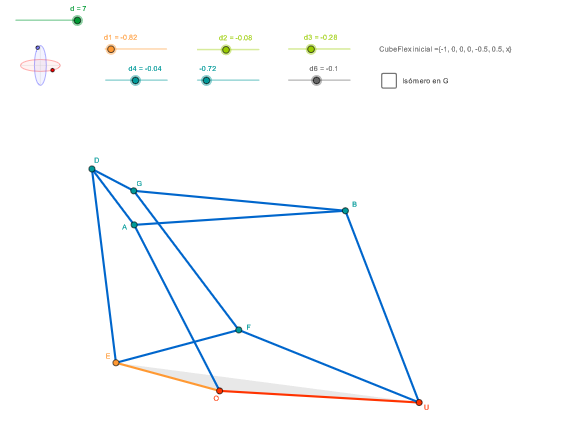
①This example demonstrates the construction of a cube, ellipses, and their projections in 3D space using vector projections and geometric transformations. ②Core mathematical concepts include 3D vector projection, orthogonal projection, spatial transformations (rotation, translation), parametric equations of ellipses, and step functions used to control graphical elements. ③Construction highlights: from the summary, commands such as OrthogonalLine, Circle, Intersect, Ellipse, Point/Punto3D, If, Vector, Angle, Segment, Midpoint, and Polygon are used, with objects like d1, d1', zElipse1, ZZ1, etc., to build complex projection relationships and dynamic geometry. ④Suitable for high school to university courses in solid geometry, vector algebra, or mathematical modeling, serving as an advanced example for visualizing projections and mastering GeoGebra's construction techniques.
GeoGebra Commands & Parameters
OrthogonalLine(C, yAxis) → zz1Circle(C, 0.62) → zz0Intersect(zz0, zz1, 1) → ZZ1Intersect(zz0, zz1, 2) → ZZ2Ellipse(ZZ1, ZZ2, 0.65) → zElipse1Point(zElipse1) → XYOrthogonalLine(C, xAxis) → zz2Intersect(zz0, zz2, 2) → ZZ3Intersect(zz0, zz2, 1) → ZZ4Ellipse(ZZ3, ZZ4, 0.65) → zElipse2Point(zElipse2) → ZPunto3D(C, XY, Z, {0, 0, 0}) → OIf(d2 > 0, (d3' * r), ((-d3') * r)) → y1If((sgn(d3) * sgn(d2)) > 0, x1a, (-x1a)) → x1If(d1 > 0, y0a, (-y0a)) → y0Punto3D(C, XY, Z, {x0, y0, 0}) → P0Vector(O, P0) → u0If(d6 > 0, (k19 + y6a0) / k18, (k19 - y6a0) / k18) → y6aIf(x0 ≠ 0, x6a, 0) → x6If(d6 > 0, (2 * y0) + y6b0, (2 * y0) - y6b0) → y6bIf(x0 ≠ 0, y6a, y6b) → y6If(x0 ≠ 0, z6a, z6b) → z6Punto3D(C, XY, Z, {x6, y6, z6}) → P6Vector(E, P6) → u4If(d5 > 0, x0 + ((-k08) + x4a0) / k07, x0 + ((-k08) - x4a0) / k07) → x4aIf(d5 > 0, z4e0, (-z4e0)) → z4eIf(d5 > 0, z4sa0, (-z4sa0)) → z4saIf(z1 ≠ 0, x4a, If[k04 ≠ 0, x4e, If[x0 ≠ 0, x4sa, 0]]) → x4If(z1 ≠ 0, y4a, If[k04 ≠ 0, y4e, If[x0 ≠ 0, y4sa, y4sb]]) → y4If(d5 > 0, z4sb0, (-z4sb0)) → z4sbIf(z1 ≠ 0, z4a, If[k04 ≠ 0, z4e, If[x0 ≠ 0, z4sa, z4sb]]) → z4Punto3D(C, XY, Z, {x4, y4, z4}) → P4Vector(E, P4) → u3If(d4 > 0, (k02 + x2a0) / k01, (k02 - x2a0) / k01) → x2aIf(d4 > 0, z2e0, (-z2e0)) → z2eIf(z1 ≠ 0, z2a, If[x1 ≠ 0, z2e, 0]) → z2If(isomeroG, z2, z2) → z8a3If(d4 > 0, x2s0, (-x2s0)) → x2sIf(z1 ≠ 0, x2a, If[x1 ≠ 0, x2e, x2s]) → x2If(isomeroG, x2, x2) → x8a3If(z1 ≠ 0, y2a, If[x1 ≠ 0, y2e, y2s]) → y2If(isomeroG, y8a2b, y8a2a) → y8a2If(isomeroG ∧ d5 < 0 ∨ (¬isomeroG) ∧ d5 ≥ 0, x8a1b, x8a1a) → x8a1If(isomeroG, x8b11b, x8b11a) → x8b11If(k23 ≟ 0, If[k22 ≟ 0, If[k21 ≟ 0, x8b22, If[k28 ≟ 0, If[k26 ≟ 0, x8b213, x8b212], x8b211]], If[k28 ≟ 0, If[k42 ≟ 0, x8b13, x8b12], x8b11]], If[k33 ≟ 0, If[k32 ≟ 0, x8a3, x8a2], x8a1]) → x8If(isomeroG, z8b12b, z8b12a) → z8b12If(isomeroG, z8b212b, z8b212a) → z8b212If(isomeroG, y8b211b, y8b211a) → y8b211If(k23 ≟ 0, If[k22 ≟ 0, If[k21 ≟ 0, z8b22, If[k28 ≟ 0, If[k26 ≟ 0, z8b213, z8b212], z8b211]], If[k28 ≟ 0, If[k42 ≟ 0, z8b13, z8b12], z8b11]], If[k33 ≟ 0, If[k32 ≟ 0, z8a3, z8a2], z8a1]) → z8If(isomeroG, y2, y2) → y8a3If(k23 ≟ 0, If[k22 ≟ 0, If[k21 ≟ 0, y8b22, If[k28 ≟ 0, If[k26 ≟ 0, y8b213, y8b212], y8b211]], If[k28 ≟ 0, If[k42 ≟ 0, y8b13, y8b12], y8b11]], If[k33 ≟ 0, If[k32 ≟ 0, y8a3, y8a2], y8a1]) → y8Punto3D(C, XY, Z, {x8, y8, z8}) → P8Vector(F, P8) → u5Punto3D(C, XY, Z, {0, d, 0}) → UIntersect(zElipse2, zz2) → ZZ7, ZZ8Angle(ZZ8, C, Z) → zAngIncIntersect(zElipse1, zz1) → ZZ5, ZZ6Angle(ZZ6, C, XY) → zAngRotSegment(ZZ5, ZZ6) → zz4Segment(ZZ7, ZZ8) → zz3Intersect(zElipse2, zElipse1, 1) → zPunto1Intersect(zElipse2, zElipse1, 4) → zPunto2Segment(zPunto1, zPunto2) → zSeg2Segment(O, U) → a1Punto3D(C, XY, Z, {x1, y1, z1}) → P1Midpoint(O, U) → A0Vector(O, P1) → u1Segment(O, A) → s01Segment(O, E) → s00Segment(P1, A0) → b01Segment(A0, P0) → b02Segment(P1, P0) → b03Punto3D(C, XY, Z, {x2, y2, z2}) → P2Vector(U, P2) → u2Segment(U, B) → s02Segment(A0, P2) → b04Midpoint(A, B) → P3Segment(P2, P3) → b05Segment(P1, P3) → b06Segment(A, B) → s04Segment(E, D) → s03Segment(A, D) → s05Midpoint(s05) → P5Segment(P0, P4) → b07Segment(P4, P5) → b08Segment(P1, P5) → b09Segment(E, F) → s06Segment(P4, P6) → b10Segment(P0, P6) → b11Segment(U, F) → s07Midpoint(s07) → P7Segment(P2, P7) → b12Segment(P6, P7) → b13Segment(A0, P7) → b14Punto3D(C, XY, Z, {x8a1, y8a1, z8a1}) → P8a1If(test8 ≟ 0, false, true) → aviso8boolSegment(B, G) → s09Segment(G, F) → s10Segment(D, G) → s08Midpoint(s08) → P10Segment(P4, P10) → b15Segment(P10, P8) → b16Segment(P6, P8) → b17Midpoint(s09) → P9Segment(P3, P5) → b18Segment(P5, P10) → b19Segment(P3, P9) → b21Segment(P10, P9) → b20Segment(P9, P2) → b22Segment(P9, P8) → b23Segment(P8, P7) → b24Polygon(O, U, E) → poly1, e, o, u
AI Drawing Prompt Reference
Create a 3D solid-geometry projection diagram. Start with a 3D coordinate setting around a central reference point, draw two perpendicular axis-direction orthogonal guide lines, and use the center with two different radii to construct two circles. Find their intersections to obtain two pairs of points, then build two ellipses in the corresponding planes from each pair. Take representative points on each ellipse and lift them into 3D as points with the same x–y but varying z. Form vectors from a reference 3D point to these lifted points, and determine the sign/branch of coordinate components using conditional rules so the points lie on the appropriate sides of the projection. Use the resulting multiple 3D points and their vectors to relate the ellipses, producing a cube-like projection and transformation effect in 3D.
The prompt above was compiled from the original drawing commands and is for reference only.