
Properties of a Trapezium: Diagonals, Angles, and Area
Loading the math board and drawing, please wait…
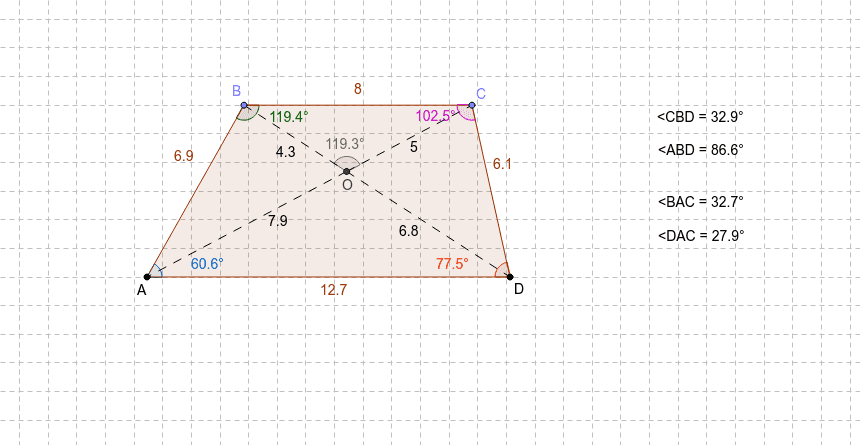
①This interactive GeoGebra example investigates the fundamental properties of a trapezium (trapezoid), focusing on whether diagonals are equal, bisect each other, or are perpendicular, along with angle sums and area relationships. ②Core mathematical concepts include the definition of a trapezium, diagonal properties, interior angle sum theorem, angle bisectors, midpoints, and area calculation, all verified through dynamic measurements. ③Construction details: Based on the summary, the example uses GeoGebra commands such as Segment, Line, Point, Polygon, Angle, Intersect, and Midpoint, creating vertices A, B, C, D, diagonal intersection P, midpoint O, and measuring angles α, β, γ, δ with angle sums anglesum1 and anglesum2 to dynamically display properties. ④This is suitable for middle or high school geometry classes, allowing students to drag vertices to observe how trapezium properties change, understand that diagonals are not always equal or bisecting, and develop dynamic exploration and proof skills.
GeoGebra Commands & Parameters
Segment(A, D) → aLine(C_1, a) → bPoint(b) → D_1Segment(C_1, D_1) → cPoint(c) → EPoint(c) → FSegment(C_1, E) → dSegment(F, D_1) → eSegment(E, F) → fPoint(d) → BPoint(e) → CPolygon(A, B, C, D) → P, a_1, g, h, b_1Angle(A, B, C) → αAngle(D, A, B) → βAngle(B, C, D) → γAngle(C, D, A) → δSegment(B, D) → iSegment(C, A) → jIntersect(i, j) → OSegment(B, O) → kSegment(O, D) → lSegment(O, C) → mSegment(O, A) → nAngle(C, O, B) → εMidpoint(A, D) → GAngle(O, B, C) → ζSegment(A_1, D_2) → a_2Line(C_2, a_2) → b_2Point(b_2) → D_3Segment(C_2, D_3) → c_1Point(c_1) → E_1Point(c_1) → F_1Segment(C_2, E_1) → d_1Segment(F_1, D_3) → e_1Segment(E_1, F_1) → f_1Point(d_1) → B_1Point(e_1) → C_3Polygon(A_1, B_1, C_3, D_2) → P_1, a_3, g_1, h_1, b_3Segment(B_1, D_2) → i_1Segment(C_3, A_1) → j_1Intersect(i_1, j_1) → O_1Segment(B_1, O_1) → k_1Segment(O_1, D_2) → l_1Segment(O_1, C_3) → m_1Segment(O_1, A_1) → n_1Midpoint(A_1, D_2) → G_1Angle(O, B, A) → ζ_1Segment(A_2, D_4) → a_4Line(C_4, a_4) → b_4Point(b_4) → D_5Segment(C_4, D_5) → c_2Point(c_2) → E_2Point(c_2) → F_2Segment(C_4, E_2) → d_2Segment(F_2, D_5) → e_2Segment(E_2, F_2) → f_2Point(d_2) → B_2Point(e_2) → C_5Polygon(A_2, B_2, C_5, D_4) → P_2, a_5, g_2, h_2, b_5Segment(B_2, D_4) → i_2Segment(C_5, A_2) → j_2Intersect(i_2, j_2) → O_2Segment(B_2, O_2) → k_2Segment(O_2, D_4) → l_2Segment(O_2, C_5) → m_2Segment(O_2, A_2) → n_2Midpoint(A_2, D_4) → G_2Segment(A_3, D_6) → a_6Line(C_6, a_6) → b_6Point(b_6) → D_7Segment(C_6, D_7) → c_3Point(c_3) → E_3Point(c_3) → F_3Segment(C_6, E_3) → d_3Segment(F_3, D_7) → e_3Segment(E_3, F_3) → f_3Point(d_3) → B_3Point(e_3) → C_7Polygon(A_3, B_3, C_7, D_6) → P_3, a_7, g_3, h_3, b_7Segment(B_3, D_6) → i_3Segment(C_7, A_3) → j_3Intersect(i_3, j_3) → O_3Segment(B_3, O_3) → k_3Segment(O_3, D_6) → l_3Segment(O_3, C_7) → m_3Segment(O_3, A_3) → n_3Midpoint(A_3, D_6) → G_3Segment(A_4, D_8) → a_8Line(C_8, a_8) → b_8Point(b_8) → D_9Segment(C_8, D_9) → c_4Point(c_4) → E_4Point(c_4) → F_4Segment(C_8, E_4) → d_4Segment(F_4, D_9) → e_4Segment(E_4, F_4) → f_4Point(d_4) → B_4Point(e_4) → C_9Polygon(A_4, B_4, C_9, D_8) → P_4, a_9, g_4, h_4, b_9Segment(B_4, D_8) → i_4Segment(C_9, A_4) → j_4Intersect(i_4, j_4) → O_4Segment(B_4, O_4) → k_4Segment(O_4, D_8) → l_4Segment(O_4, C_9) → m_4Segment(O_4, A_4) → n_4Midpoint(A_4, D_8) → G_4Angle(B, A, C) → ηAngle(C, A, D) → θ
AI Drawing Prompt Reference
Draw a trapezoid and display its properties such as diagonals, angles, and area. Start by constructing the four sides of the trapezoid, then connect the diagonals and mark their intersection point. Measure and display the angles of the four interior angles to verify the angle sum theorem. Next, find the midpoints of the diagonals, measure their lengths and angles, and observe whether they are equal or bisect each other. Finally, calculate the area of the trapezoid and dynamically show how these properties change as the vertices are dragged.
The prompt above was compiled from the original drawing commands and is for reference only.