
Properties of a Kite by Jovena Sim
Loading the math board and drawing, please wait…
In collections
Parallelogram
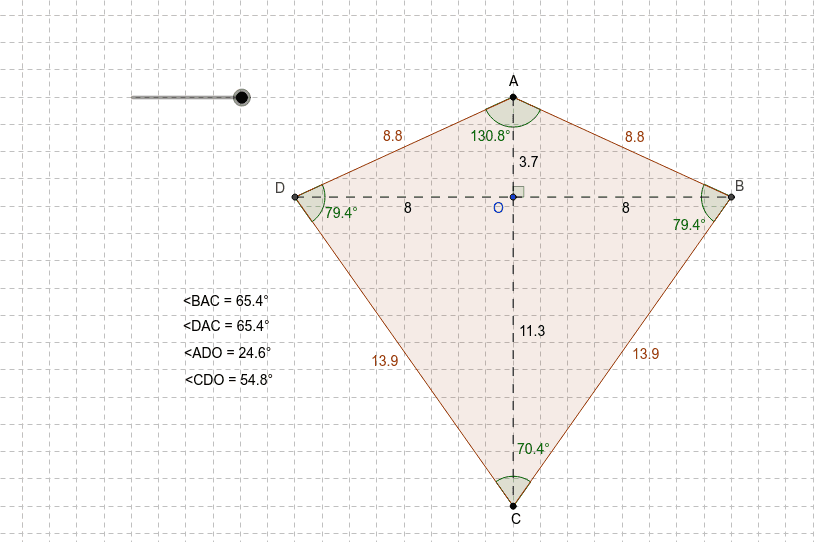
This example demonstrates the geometric properties of a kite using GeoGebra. Key concepts include triangles, circles, coordinate geometry, and geometric construction. The construction involves commands like Segment, Point, OrthogonalLine to create the kite shape and analyze its symmetry and angle relationships. Suitable for middle school students or high school students for geometry learning, and teachers for instructional demonstrations.
GeoGebra Commands & Parameters
Segment(A, C) → aPoint(a) → OOrthogonalLine(O, a) → bCircle(O, r) → dIntersect(d, b) → D, BPolygon(D, A, B, C) → P, d_1, a_1, e, b_1Segment(D, O) → cSegment(O, B) → fAngle(B, O, A) → αAngle(O, A, B) → βAngle(A, D, O) → γSegment(A, O) → gSegment(O, C) → hSegment(A_1, C_1) → a_2Point(a_2) → O_1OrthogonalLine(O_1, a_2) → b_2Circle(O_1, r) → d_2Intersect(d_2, b_2) → D_1, B_1Segment(D_1, O_1) → c_1Angle(C, D, O) → γ_1Segment(A_1, O_1) → g_1Segment(A_2, C_2) → a_3Point(a_3) → O_2OrthogonalLine(O_2, a_3) → b_3Circle(O_2, r) → d_3Intersect(d_3, b_3) → D_2, B_2Segment(O_2, B_2) → f_1Angle(B_2, O_2, A_2) → α_1Angle(O, A, D) → β_1Angle(A, D, C) → δAngle(D, A, B) → εAngle(A, B, C) → ζAngle(D, C, B) → η
AI Drawing Prompt Reference
This is a geometric figure composed of symmetric shapes, including a central point O and two symmetric line segments. The construction starts by drawing a line segment AC, then drawing a circle centered at O and intersecting it with a perpendicular line to AC to obtain points D and B. Next, connect D, A, B, and C to form a polygon, and draw segments from O to D and O to B. By measuring angles, you can observe symmetry. The overall figure combines triangles, circles, and coordinate geometry, suitable for geometry learning.
The prompt above was compiled from the original drawing commands and is for reference only.