
Properties and Construction of Parallelograms and Rectangles
Loading the math board and drawing, please wait…
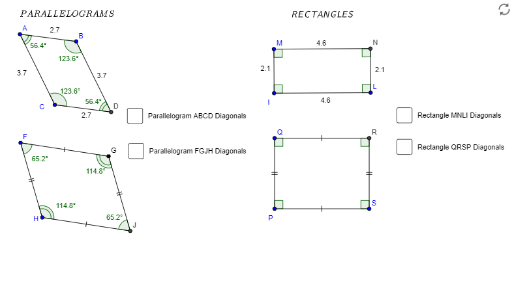
This GeoGebra example demonstrates the geometric properties and construction methods of parallelograms and rectangles. Key mathematical concepts include: opposite sides of parallelograms are parallel and equal, diagonals bisect each other; rectangles have four right angles and equal diagonals; vector addition and subtraction operations and their geometric meaning; geometric mean in combinatorics. Construction points: Use Line and Segment commands to draw edges; Intersect to find intersection points; Midpoint to construct midpoints; Angle to measure angles and verify right angles; OrthogonalLine to draw perpendicular lines; Point to add control points; Distance to measure edge lengths and verify equality. Suitable for middle school mathematics (grades 6-9) learning quadrilateral properties, vector introduction, and geometric construction practice.
GeoGebra Commands & Parameters
Segment(A, B) → aLine(C, a) → bSegment(C, A) → cLine(B, c) → dIntersect(b, d) → DSegment(C, D) → eSegment(B, D) → fSegment(A, D) → gSegment(C, B) → hMidpoint(C, B) → ESegment(C, E) → iSegment(E, A) → jSegment(E, B) → kSegment(E, D) → lSegment(F, G) → a_1Line(H, a_1) → b_1Segment(H, F) → c_1Line(G, c_1) → d_1Intersect(b_1, d_1) → JSegment(H, J) → e_1Segment(G, J) → f_1Segment(F, J) → g_1Segment(H, G) → h_1Midpoint(H, G) → KSegment(H, K) → i_1Segment(K, F) → j_1Segment(K, G) → k_1Segment(K, J) → l_1Angle(K, F, G) → αAngle(H, F, K) → βAngle(K, H, F) → γAngle(J, H, K) → δAngle(K, J, H) → εAngle(G, J, K) → ζAngle(K, G, J) → ηAngle(F, G, K) → θAngle(G, K, F) → ιAngle(H, K, J) → κAngle(J, K, G) → λAngle(F, K, H) → μSegment(I, L) → mOrthogonalLine(I, m) → nOrthogonalLine(L, m) → pPoint(n) → MOrthogonalLine(M, n) → qIntersect(p, q) → NSegment(M, I) → rSegment(M, N) → sSegment(N, L) → tMidpoint(I, N) → ZSegment(I, Z) → m_1Segment(Z, M) → n_1Segment(Z, N) → p_1Segment(Z, L) → q_1Segment(P, S) → m_2OrthogonalLine(P, m_2) → n_3OrthogonalLine(S, m_2) → p_3Point(n_3) → QOrthogonalLine(Q, n_3) → q_3Intersect(p_3, q_3) → RSegment(Q, P) → r_1Segment(Q, R) → s_1Segment(R, S) → t_1Midpoint(P, R) → TSegment(P, T) → m_3Segment(T, Q) → n_2Segment(T, R) → p_2Segment(T, S) → q_2Segment(T, P) → a_2Angle(T, R, S) → νAngle(R, S, T) → ξAngle(P, T, S) → οAngle(T, S, P) → ρAngle(T, P, Q) → σAngle(S, P, T) → τAngle(R, T, Q) → υAngle(T, Q, R) → ϕAngle(P, Q, T) → χAngle(Q, T, P) → ψAngle(S, T, R) → ωAngle(Q, R, T) → α_1Angle(H, F, G) → β_1Angle(G, J, H) → γ_1Angle(J, H, F) → δ_1Angle(F, G, J) → ε_1Distance(M, L) → distanceMLDistance(I, N) → distanceINAngle(P, Q, R) → ζ_1Angle(S, P, Q) → η_1Angle(Q, R, S) → θ_1Angle(R, S, P) → ι_1Angle(N, L, I) → κ_1Angle(M, N, L) → λ_1Angle(I, M, N) → μ_1Angle(L, I, M) → ν_1Angle(C, A, B) → ξ_1Angle(D, C, A) → ο_1Angle(A, B, D) → ρ_1Angle(B, D, C) → σ_1
AI Drawing Prompt Reference
Draw two parallelograms. For the first, start with three arbitrary points, construct the fourth vertex by drawing lines parallel to opposite sides and finding their intersection, then connect all vertices. Mark the intersection of the diagonals and draw segments from this point to each vertex. For the second parallelogram, use a similar construction but also measure and label all interior angles. Finally, outside the parallelograms, take a segment, draw perpendicular lines at both endpoints, pick a point on one perpendicular, draw another perpendicular through it to intersect the other perpendicular, forming a rectangle, and connect the relevant vertices.
The prompt above was compiled from the original drawing commands and is for reference only.