
Proof Without Words: Pythagorean Theorem via Drag and Slider
Loading the math board and drawing, please wait…
In collections
Similarity & Right Triangle Trigonometry
Similarity, Right Triangles, and Trigonometry (SRT) Cluster
Proofs Without Words
Proofs Without Words
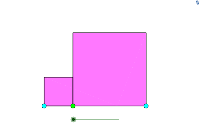
This example demonstrates the Pythagorean Theorem through interactive dragging of points and a slider. It involves concepts like right triangles, Pythagorean theorem, geometric transformations, and coordinate geometry. Construction uses GeoGebra commands such as Point, Segment, Midpoint, Polygon, Mirror, Intersect, and Rotate. Suitable for middle or high school mathematics education to illustrate geometric proofs and coordinate geometry applications.
GeoGebra Commands & Parameters
Point(xAxis) → APoint(xAxis) → BSegment(A, B) → aMidpoint(a) → HSegment(A, H) → kPoint(k) → CPolygon(C, B, 4) → poly1, b, c, d, e, D, EPolygon(A, C, 4) → poly2, f, g, h, i, F, GMirror(C, H) → C'Polygon(A, G, C') → poly3, c', a_1, g_1Polygon(C', B, D) → poly4, d_1, c'_1, b_1Segment(E, C) → jIntersect(a_1, j) → IRotate(C', (-α), D) → C''Rotate(B, (-α), D) → B'Rotate(D, (-α), D) → D'Polygon(C'', B', D') → poly4', d', c'', b'Rotate(A, α, G) → A'Rotate(G, α, G) → G'Rotate(C', α, G) → C''_1Polygon(A', G', C''_1) → poly3', c''_1, a', g'Polygon(G, C', D, E, F) → poly5, g_2, c'_2, d_2, e_1, f_1
AI Drawing Prompt Reference
Draw a horizontal segment on the x-axis with two endpoints. Mark its midpoint, then choose a point between the midpoint and the left endpoint. Construct two squares: one using the right endpoint and the chosen point, another using the chosen point and the left endpoint. Reflect the chosen point across the midpoint to get a symmetric point. Use this symmetric point and square vertices to form two right triangles, then rotate these triangles to fit around the squares. Finally, connect outer vertices to form a large square, visually demonstrating that the sum of the two smaller squares' areas equals the large square's area.
The prompt above was compiled from the original drawing commands and is for reference only.