
Probability Example
Loading the math board and drawing, please wait…
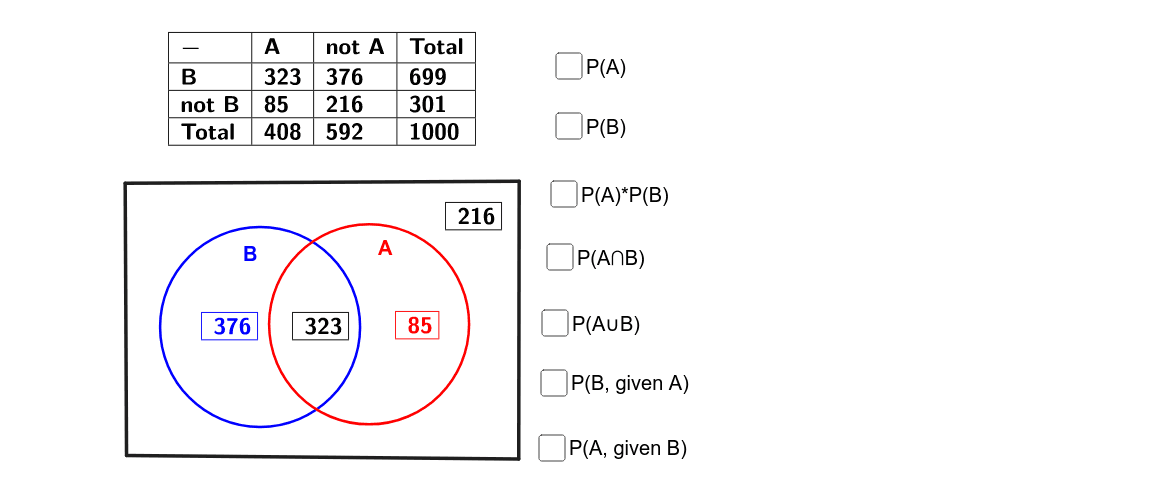
This example demonstrates basic probability concepts, involving random events and area calculations of circles and polygons. Using GeoGebra commands such as Random, Circle, Area, and PointIn, it provides an intuitive way to explore key concepts in probability and statistics. Suitable for middle school and above students.
GeoGebra Commands & Parameters
Random(200, 400) → C3Random(200, 400) → D3Random(50, 100) → C4Circle(M, 2) → cCircle(N, 2) → dArea(d) → aPointIn(d) → PointdPolygon(C, D, E, F) → poly1, c_1, d_1, e, fTableText({{C3}}, "|_") → text1TableText({{D3}}, "|_") → text2TableText({{C4}}, "|_") → text3TableText({{D4}}, "|_") → text4TableText({{C8}}, "|_") → text5TableText({{D8}}, "|_") → text6TableText({{E8}}, "|_") → text7Random(200, 400) → C3_1Random(50, 100) → C4_1Random(200, 400) → C3_2Random(50, 100) → C4_2Random(200, 400) → C3_3Random(200, 400) → C3_4Random(200, 400) → D3_1TableText({{B2, C2, D2, E2}, {B3, C3, D3, E3}, {B4, C4, D4, E4}, {B5, C5, D5, E5}}, "|_") → text10Random(200, 400) → C3_5Random(200, 400) → D3_2
AI Drawing Prompt Reference
Draw a graph with two circles and some points. The circles have a radius of 2 and random centers. Calculate the area of the circles and check if points are inside them. Draw some triangles and rectangles, and label random points with text. Ensure the layout is clear to show probability and geometric concepts.
The prompt above was compiled from the original drawing commands and is for reference only.