
Pop that Balloon 3
Loading the math board and drawing, please wait…
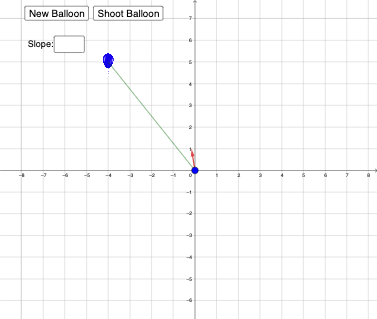
This example demonstrates the intersection of a line and a circle. Key mathematical concepts include lines, circles, vectors, and coordinate geometry. Using GeoGebra commands such as RandomElement, Point, Circle, and OrthogonalLine, dynamic geometric figures can be constructed. Suitable for middle school and above students to learn about the positional relationship between lines and circles.
GeoGebra Commands & Parameters
RandomElement({-1, 1, -2, 2, -3, 3, -4, 4, -5, 5, -6, 6}) → a, -4Point(xAxis) → ORandomElement({-1, 1, -2, 2, -3, 3, -4, 4, -5, 5, -6, 6}) → b, 5Circle(P, 5) → cOrthogonalLine(P, yAxis) → fLine(P, yAxis) → gIntersect(c, g, 2) → BIntersect(c, g, 1) → CIntersect(c, f, 2) → DIntersect(c, f, 1) → ETextfield(ans) → InputBox1Intersect(f, p) → GCircle(O, r) → dRay(O, G) → iIntersect(d, i, 1) → HCircle(O, r - 1) → eIntersect(e, i, 1) → IVector(I, H) → uRay(O, Q) → hIntersect(d, h, 1) → ACircle(O, r - 1) → kIntersect(k, h, 1) → FVector(F, A) → vDefined(ans) → ansvalueIsInRegion(P, d) → PinDLine(O, P) → jSegment(O, P) → l
AI Drawing Prompt Reference
Draw a line and a circle with a random direction, showing their intersection points. The circle's center is on the x-axis, and the line passes through the center. Draw a line perpendicular to the x-axis and find its intersection points with the circle. Use these points to draw two new circles and show their intersection points. Finally, draw rays from the circle's center and mark the intersection points with the circles and the perpendicular line, as well as the vectors connecting these points.
The prompt above was compiled from the original drawing commands and is for reference only.