
Plotting Points in Polar Coordinates: From (ρ, θ) to Geometry
Loading the math board and drawing, please wait…
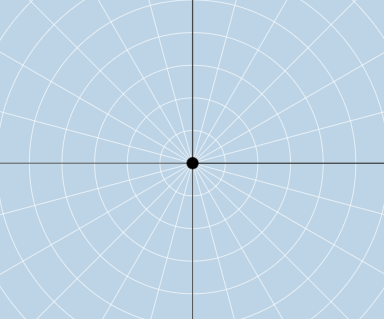
This GeoGebra example demonstrates how to place points in the polar plane using a prescribed angle and radius, then inspect the resulting geometric relationships by drawing and transforming them. It centers on core ideas of polar coordinates (ρ, θ) and how angle–distance information determines point positions, along with supporting geometry concepts such as vectors, rays/lines, circles, and symmetry. The construction uses GeoGebra commands including Ray and Circle to establish directional (angular) rays and radius constraints, Vector to represent position/direction information, and Line to connect or frame geometric elements. Mirror is used to create symmetric configurations, while RandomElement and button controls enable dynamic point/parameter selection and repeated visualization. The example relies on multiple constructed points and parameter/data lists (e.g., rlist, flist, and various labeled objects like text1–text5) to generate, update, and annotate the figures. Suitable for middle school through early university, especially for coordinate geometry, trigonometry practice, and classroom quizzes on polar-coordinate graphing.
GeoGebra Commands & Parameters
Ray(B, C) → fCircle(B, D) → cMirror(B, B) → B'_1RandomElement(flist) → jRandomElement(rlist) → raVector(B, H) → vLine(B, H) → mFractionText(j) → text3Ray((0, 0), (0, 1)) → gRay((0, 0), (-1, 0)) → hRay((0, 0), (0, -1)) → i
AI Drawing Prompt Reference
Draw points in polar coordinates starting with a given angle and radius. First, draw directional rays g, h, and i. Then, draw a circle c centered at point B. Use a mirror operation to get the symmetric point B'. With a randomly selected ray f and radius ra, determine the position of a point in the polar coordinate system. Represent the position and direction with vector v and draw a line m connecting point B and the new point. Finally, add text annotations to show the number of the randomly selected ray.
The prompt above was compiled from the original drawing commands and is for reference only.