
Polygon Transformation and Congruence
Loading the math board and drawing, please wait…
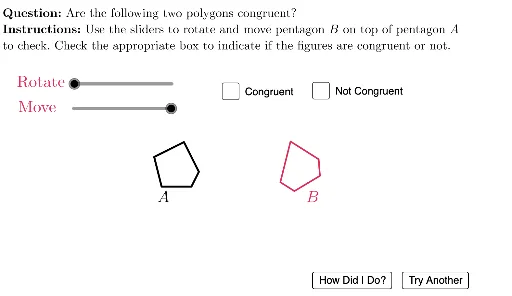
This example demonstrates polygon transformations and congruence. Key mathematical concepts include polygons, transformations, and congruence. Using GeoGebra commands such as Polygon, Translate, Rotate, students can explore the rotation and translation of polygons and determine if they are congruent. Suitable for middle school and above students to learn about geometric transformations and congruence.
GeoGebra Commands & Parameters
Polygon({(1.5, 2), (3.5, 2), (4, 3), (3, 5), (1, 4)}) → Pent1Polygon({(1, 2), (4, 2), (2, 5)}) → Triangle1Polygon({(1, 2), (4, 2), (4, 5), (2, 4)}) → Quad1Translate(Rotate[Translate[Rotate[Pent1, RotAngle, RotPt], (8, 0)], (a * 10), RotPt2], (move, 0)) → Pent2Translate(Rotate[Translate[Rotate[Triangle1, RotAngle, RotPt], (8, 0)], a, RotPt2], (move, 0)) → Triangle2Translate(Rotate[Translate[Rotate[Quad1, RotAngle, RotPt], (8, 0)], (a * 10), RotPt2], (move, 0)) → Quad2Random(1, 3) → ansTranslate(Rotate[Translate[Rotate[Polygon[{(2, 2), (4, 2), (2, 5)}], RotAngle, RotPt], (8, 0)], a, RotPt2], (move, 0)) → Triangle2Wrong1Translate(Rotate[Translate[Rotate[Dilate[Triangle1, 0.7, RotPt], RotAngle, RotPt], (8, 0)], a, RotPt2], (move, 0)) → Triangle2Wrong2Translate(Rotate[Translate[Rotate[Polygon[{(1, 2), (4, 2), (4, 4), (2, 4)}], RotAngle, RotPt], (8, 0)], (a * 10), RotPt2], (move, 0)) → Quad2Wrong1Translate(Rotate[Translate[Rotate[Dilate[Quad1, 0.7, RotPt], RotAngle, RotPt], (8, 0)], (a * 10), RotPt2], (move, 0)) → Quad2Wrong2Translate(Rotate[Translate[Rotate[Polygon[(1.5, 2), (3.5, 2), (4, 3), (3, 5), (1, 3)], RotAngle, RotPt], (8, 0)], (a * 10), RotPt2], (move, 0)) → Pent2Wrong1Translate(Rotate[Translate[Rotate[Dilate[Pent1, 0.7, RotPt], RotAngle, RotPt], (8, 0)], (a * 10), RotPt2], (move, 0)) → Pent2Wrong2If(numsides ≟ 3, (2 * π), π / 5) → maxrotUnicodeToLetter(10007) → xmarkUnicodeToLetter(10003) → cmark
AI Drawing Prompt Reference
Draw a pentagon and then rotate and translate it around a point to create a new pentagon. Next, draw a triangle and a quadrilateral, rotate and translate them around their center points to create new triangles and quadrilaterals. Finally, use random angles and scaling to create some deformed triangles and quadrilaterals.
The prompt above was compiled from the original drawing commands and is for reference only.