
Polygon Rotation Art
Loading the math board and drawing, please wait…
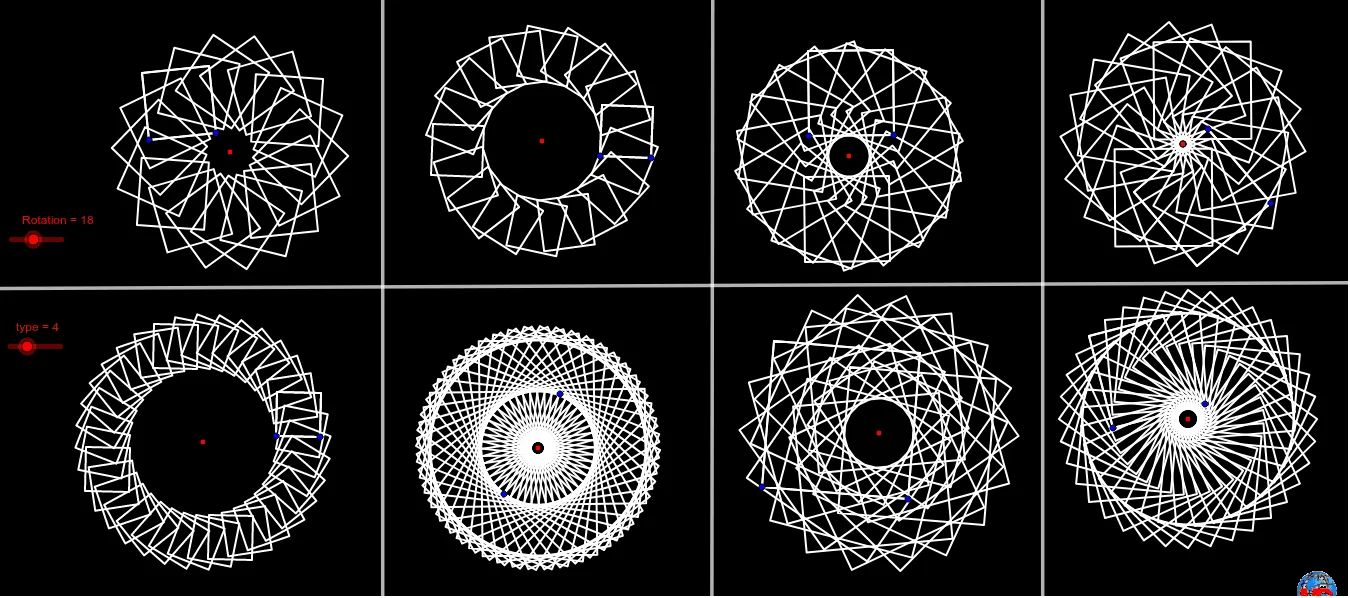
This example demonstrates the artistic effect of rotating polygons. Key mathematical concepts include polygons and rotation. Using GeoGebra commands such as Polygon, Sequence, and Line, you can construct rotating polygons. Suitable for middle school and above students to learn geometric transformations.
GeoGebra Commands & Parameters
Polygon(B, C, type) → poly1, a, j, D, E, F, G, H, I, J, K, b, c, d, e, f, g, h, iSequence(Rotate[poly1, i, A], i, 0, 6.283185307179586, (2 * π / Rotation)) → liste1Polygon(M, N, type) → poly2, k, b_2, O, P, Q, R, S, T, M_1, R_1, l, m, q, r, s, t, a_1, q_1Sequence(Rotate[poly2, i, L], i, 0, 6.28319, (2 * π / Rotation)) → liste2Polygon(V, W, type) → poly3, b_1, c_2, Z, A_1, B_1, C_1, D_1, N_1, O_1, S_1, c_1, d_1, e_1, f_1, g_1, h_1, r_1, s_1Sequence(Rotate[poly3, i, U], i, 0, 6.28319, (2 * π / Rotation)) → liste3Polygon(F_1, G_1, type) → poly4, i_1, d_2, H_1, I_1, J_1, K_1, L_1, P_1, Q_1, T_1, j_1, k_1, l_1, m_1, n_1, p_1, t_1, a_2Sequence(Rotate[poly4, i, E_1], i, 0, 6.28319, (2 * π / Rotation)) → liste4Polygon(V_1, W_1, type) → poly5, e_2, m_3, Z_1, A_2, B_2, C_2, R_2, U_2, V_2, C_3, f_2, g_2, h_2, i_2, j_2, d_3, g_3, h_3Sequence(Rotate[poly5, i, U_1], i, 0, 6.28319, π / Rotation) → liste5Polygon(E_2, F_2, type) → poly6, k_2, n_3, G_2, H_2, I_2, P_2, S_2, W_2, Z_2, D_3, l_2, m_2, n_2, p_2, b_3, e_3, i_3, j_3Sequence(Rotate[poly6, i, D_2], i, 0, 6.28319, (0.75 * π / Rotation)) → liste6Polygon(K_2, L_2, type) → poly7, q_2, p_3, M_2, N_2, O_2, Q_2, T_2, A_3, B_3, E_3, r_2, s_2, t_2, a_3, c_3, f_3, k_3, l_3Sequence(Rotate[poly7, i, J_2], i, 0, 6.28319, (2 * π / Rotation)) → liste7Polygon(G_3, H_3, type) → poly8, q_3, L_3, r_3, s_3, t_3, a_4, n, I_3, J_3, K_3Sequence(Rotate[poly8, i, F_3], i, 0, 6.28319, π / Rotation) → liste8Line(M_3, N_3) → pLine(O_3, P_3) → f_4Line(Q_3, R_3) → g_4Line(S_3, T_3) → h_4
AI Drawing Prompt Reference
Create an artistic pattern composed of multiple rotating polygons. First, draw a hexagon and rotate it 6 times around a point to form a rotation sequence. Then, draw another hexagon and rotate it 6 times around another point to form another rotation sequence. Next, draw a third hexagon and rotate it 6 times around a third point to form a third rotation sequence. Finally, draw a fourth hexagon and rotate it 6 times around a fourth point to form a fourth rotation sequence. Each hexagon is rotated around a different point, creating a complex rotating polygon art pattern.
The prompt above was compiled from the original drawing commands and is for reference only.