
Planets Revolution (3D)
Loading the math board and drawing, please wait…
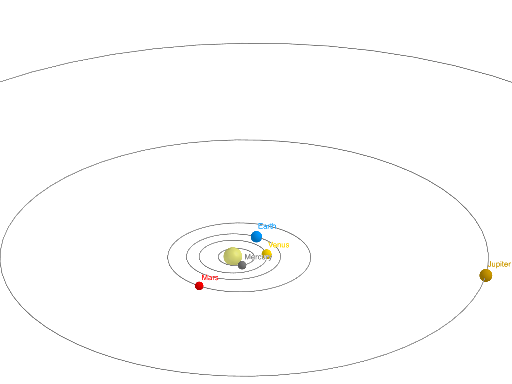
This example demonstrates the 3D revolution of planets. Key mathematical concepts include circles, rotation, and locus. Using GeoGebra commands such as Intersect, Point, Circle, Ray, Rotate, etc., a dynamic model of planetary revolution can be constructed. Suitable for high school and above students or teachers for teaching and learning.
GeoGebra Commands & Parameters
Intersect(xAxis, yAxis) → APoint(eq1) → BPoint(eq2) → CPoint(eq3) → DPoint(eq5) → FPoint(eq6) → GPoint(eq7) → HPoint(eq8) → ICircle(G, 0.25) → dRay(A, B) → fRotate(A, Mercury, A) → A'Rotate(B, Mercury, A) → B'Ray(A', B') → f'Intersect(eq1, f', 1) → MRotate(A, Venus, A) → A'_{1}Rotate(C, Venus, A) → VRay(A'_{1}, V) → g'Point(xAxis) → LRay(A, L) → gRotate(A, Earth, A) → A'_{2}Rotate(L, Earth, A) → L'Ray(A'_{2}, L') → g'_{1}Intersect(eq3, g'_{1}, 1) → ERotate(A, Mars, A) → A'_{3}Rotate(L, Mars, A) → L'_{1}Ray(A'_{3}, L'_{1}) → g'_{2}Intersect(eq4, g'_{2}, 1) → E_{1}Rotate(A, Jupiter, A) → A'_{4}Rotate(L, Jupiter, A) → L'_{2}Ray(A'_{4}, L'_{2}) → g'_{3}Intersect(eq5, g'_{3}, 1) → JRotate(A, Saturn, A) → A'_{5}Rotate(L, Saturn, A) → L'_{3}Ray(A'_{5}, L'_{3}) → g'_{4}Intersect(eq6, g'_{4}, 1) → NRotate(A, Uranus, A) → A'_{6}Rotate(L, Uranus, A) → L'_{4}Ray(A'_{6}, L'_{4}) → g'_{5}Intersect(eq7, g'_{5}, 1) → OCircle(N, 0.4) → eCircle(N, 0.3) → hRotate(A, Neptune, A) → A'_{7}Rotate(L, Neptune, A) → L'_{5}Ray(A'_{7}, L'_{5}) → g'_{6}Intersect(eq8, g'_{6}, 1) → PCircle(A, 0.2) → cCircle(A, 0.2) → kCenter(c) → KPoint(k) → QSphere(K, Q) → j
AI Drawing Prompt Reference
Create a 3D model of planetary revolution showing planets orbiting around a central point. Start by identifying the intersection of coordinate axes, use these as centers to draw circular orbits, and generate the paths of planets through rotation and intersection operations. Add circles of varying sizes to represent the planets. The final image should depict a dynamic planetary system with a sun and planets revolving around it, suitable for educational purposes.
The prompt above was compiled from the original drawing commands and is for reference only.