
Plane Through Cube with Cross-Section
Loading the math board and drawing, please wait…
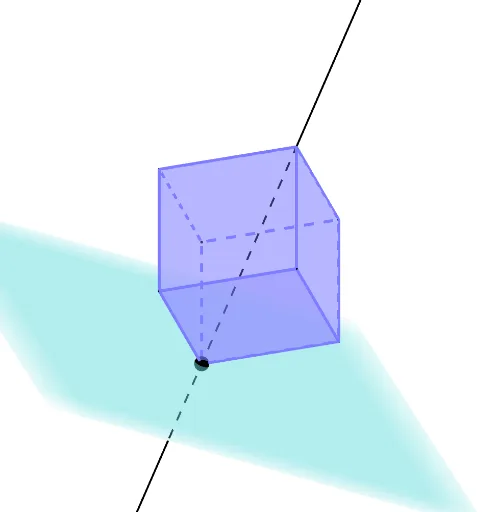
This example demonstrates a plane passing through a cube and its cross-section. Key mathematical concepts include the relationship between planes and polyhedra in solid geometry. Using GeoGebra commands such as Polygon, Prism, and Line, the construction of the cube and its plane cross-section is illustrated. Suitable for middle school and above students studying solid geometry.
GeoGebra Commands & Parameters
Polygon(B, C, D, E) → poly1, b, c, d, ePrism(poly1, 0) → a, F, edgeBF, edgeCG, edgeDH, edgeEI, edgeFG, edgeGH, edgeHI, edgeFI, G, H, I, faceBCGF, faceCDHG, faceDEIH, faceBEIF, faceFGHIPrism(faceFGHI, -4) → f, J, edgeFJ, edgeGK, edgeHL, edgeIM, edgeJK, edgeKL, edgeLM, edgeJM, K, L, M, faceFGKJ, faceGHLK, faceHIML, faceFIMJ, faceJKLMLine(G, M) → gPoint(g) → NOrthogonalPlane(L, g) → hPlane(N, h) → iIntersectPath(i, f) → poly2, O, n, p, q, P, Q, R, S, T, k, l, mPerimeter(poly2) → perimeterpoly2Perimeter(poly2) → o
AI Drawing Prompt Reference
Draw a cube and a plane passing through it to show its cross-section. Start by creating a square face for the cube, then extend it upward to form the cube. Next, draw a parallel square above the base and connect the corresponding vertices to form a prism. Then, from a vertex of the top square, draw a line extending upward, rotate the top square around this line to form the cross-section polygon, and finally calculate the perimeter of the cross-section polygon.
The prompt above was compiled from the original drawing commands and is for reference only.