
Philippine Abaniko: Rotation-symmetric geometry with incircle and equilateral tr
Loading the math board and drawing, please wait…
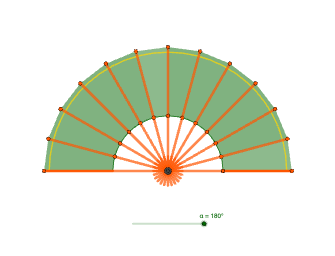
This example demonstrates how to build a rotation-symmetric geometric figure using repeated constructions, highlighting the relationship between an incircle (inscribed circle) and equilateral-triangle structure. Key concepts include rotation and symmetry, circle and arc constructions (circumcircle arcs and circle arcs), angle bisectors, and the geometric constraints that lead to inscribed/interacting circles. Construction outline: start with Point, Intersect, and Segment to place key points and intersection nodes; apply Rotate to generate rotated copies of the fundamental parts; use Circle together with CircumcircleArc and CircleArc to draw the required circles and arcs; construct necessary angles via AngularBisector; then employ Polygon, Midpoint, and Ray to assemble triangle configurations and auxiliary elements that enforce the equilateral-triangle relationships. The repeated creation of corresponding points (e.g., A′, B′, A′1, B′1, etc.) makes the symmetry explicit and visually verifies the structure. Suitable for secondary school geometry and contest preparation, especially lessons on transformation geometry and classical constructions involving circles and angle bisectors.
GeoGebra Commands & Parameters
Point(xAxis) → AIntersect(xAxis, yAxis) → BSegment(A, B) → fRotate(A, (-α), B) → A'Rotate(B, (-α), B) → B'Segment(A', B') → f'Rotate(A, -15°, B) → A'_{1}Rotate(B, -15°, B) → B'_{1}Segment(A'_{1}, B'_{1}) → f'_{1}Rotate(A'_{1}, -15°, B) → DRotate(B'_{1}, -15°, B) → ESegment(D, E) → gRotate(D, -15°, B) → D'Rotate(E, -15°, B) → E'Segment(D', E') → g'Rotate(D', -15°, B) → D''Rotate(E', -15°, B) → E''Segment(D'', E'') → g''Rotate(D'', -15°, B) → D'''Rotate(E'', -15°, B) → E'''Segment(D''', E''') → g'''Rotate(D''', -15°, B) → FRotate(E''', -15°, B) → GSegment(F, G) → hRotate(F, -15°, B) → F'Rotate(G, -15°, B) → G'Segment(F', G') → h'Rotate(F', -15°, B) → F''Rotate(G', -15°, B) → G''Segment(F'', G'') → h''Rotate(F'', -15°, B) → F'''Rotate(G'', -15°, B) → G'''Segment(F''', G''') → h'''Rotate(F''', -15°, B) → HRotate(G''', -15°, B) → ISegment(H, I) → iRotate(H, -15°, B) → H'Rotate(I, -15°, B) → I'Segment(H', I') → i'Point(f) → JCircle(B, J) → cIntersect(c, f', 1) → KIntersect(c, f'_{1}, 1) → LCircumcircleArc(J, L, K) → dAngularBisector(A'_{1}, B, A) → jAngularBisector(D, B, A'_{1}) → kCircle(B, A'_{1}) → ePolygon(A'_{1}, A, J, L) → q1, a'_{1}, a, j_1, l_1Rotate(A'_{1}, -15°, B) → PRotate(A, -15°, B) → A'_{3}Rotate(J, -15°, B) → J'Rotate(L, -15°, B) → L'Polygon(P, A'_{3}, J', L') → q1', p, a'_{3}, j', l'Rotate(P, -15°, B) → P'Rotate(A'_{3}, -15°, B) → QRotate(J', -15°, B) → J''Rotate(L', -15°, B) → L''Polygon(P', Q, J'', L'') → q1'', p', q, j'', l''Rotate(P', -15°, B) → P''Rotate(Q, -15°, B) → Q'Rotate(J'', -15°, B) → J'''Rotate(L'', -15°, B) → L'''Polygon(P'', Q', J''', L''') → q1''', p'', q', j''', l'''Rotate(P'', -15°, B) → P'''Rotate(Q', -15°, B) → Q''Rotate(J''', -15°, B) → RRotate(L''', -15°, B) → SPolygon(P''', Q'', R, S) → q2, p''', q'', r, sRotate(P''', -15°, B) → TRotate(Q'', -15°, B) → Q'''Rotate(R, -15°, B) → R'Rotate(S, -15°, B) → S'Polygon(T, Q''', R', S') → q2', t, q''', r', s'Rotate(T, -15°, B) → T'Rotate(Q''', -15°, B) → URotate(R', -15°, B) → R''Rotate(S', -15°, B) → S''Polygon(T', U, R'', S'') → q2'', t', u, r'', s''Rotate(T', -15°, B) → T''Rotate(U, -15°, B) → U'Rotate(R'', -15°, B) → R'''Rotate(S'', -15°, B) → S'''Polygon(T'', U', R''', S''') → q2''', t'', u', r''', s'''Rotate(T'', -15°, B) → T'''Rotate(U', -15°, B) → U''Rotate(R''', -15°, B) → VRotate(S''', -15°, B) → WPolygon(T''', U'', V, W) → q3, t''', u'', v, wRotate(T''', -15°, B) → ZRotate(U'', -15°, B) → U'''Rotate(V, -15°, B) → V'Rotate(W, -15°, B) → W'Polygon(Z, U''', V', W') → q3', z_1, u''', v', w'Rotate(Z, -15°, B) → Z'Rotate(U''', -15°, B) → A_1Rotate(V', -15°, B) → V''Rotate(W', -15°, B) → W''Polygon(Z', A_1, V'', W'') → q3'', z', a_1, v'', w''Rotate(Z', -15°, B) → Z''Rotate(A_1, -15°, B) → B_1Rotate(V'', -15°, B) → V'''Rotate(W'', -15°, B) → W'''Polygon(W'', K, A', H') → q4, n, k_1, a', bPolygon(A', A, J, K) → q5, l, a_2, j_2, k_2Polygon(A', D, L', K) → q6, m, d_1, f_1, k_3Polygon(A', A'_{1}, L, K) → q7, g_1, h_1, l_2, k_4Polygon(D', L'', K, A') → q8, d', i_1, k_5, m_1Polygon(D'', A', K, L''') → q9, d'', n_1, k_6, p_1Polygon(D''', S, K, A') → q10, d''', s_1, k_7, q_1Polygon(F, A', K, S') → q11, f_2, r_1, k_8, t_1Polygon(F', S'', K, A') → q12, b_1, c_1, k_9, e_1Polygon(F'', A', K, S''') → q13, f'', g_2, k_{10}, h_2Polygon(F''', A', K, W) → q14, f''', i_2, k_{11}, w_1Polygon(W', K, A', H) → q15, m_2, k_{12}, n_2, h_3Midpoint(D, A'_{1}) → MPoint(f) → NCircle(B, N) → c_2Intersect(c_2, f', 1) → OIntersect(c_2, f'_{1}, 1) → C_1CircumcircleArc(N, C_1, O) → d_2CircleArc(B, O, N) → e_2Point(f) → D_1Circle(B, D_1) → p_2Intersect(p_2, f'_{1}, 1) → E_1Intersect(p_2, g, 1) → F_1Intersect(p_2, g', 1) → G_1Intersect(p_2, g'', 1) → H_1Intersect(p_2, g''', 1) → I_1Intersect(p_2, h, 1) → J_1Intersect(p_2, h', 1) → K_1Intersect(p_2, h'', 1) → L_1Intersect(p_2, h''', 1) → M_1Intersect(p_2, i, 1) → N_1Intersect(p_2, i', 1) → O_1Intersect(p_2, f', 1) → P_1Ray(P_1, B) → q_2Ray(E_1, B) → r_2Ray(F_1, B) → s_2Ray(G_1, B) → t_2Ray(H_1, B) → b_2Ray(I_1, B) → f_3Ray(J_1, B) → g_3Ray(K_1, B) → i_3Ray(L_1, B) → j_3Ray(M_1, B) → l_3Ray(N_1, B) → m_3Ray(O_1, B) → n_3Intersect(p_2, n_3, 2) → Q_1Intersect(p_2, m_3, 2) → R_1Intersect(p_2, l_3, 2) → S_1Intersect(p_2, j_3, 2) → T_1Intersect(p_2, i_3, 2) → U_1Intersect(p_2, g_3, 2) → V_1Intersect(p_2, f_3, 2) → W_1Intersect(p_2, b_2, 2) → Z_1Intersect(p_2, t_2, 2) → A_2Intersect(p_2, s_2, 2) → B_2Intersect(p_2, r_2, 2) → C_2Segment(E_1, C_2) → p_3Ray(P_1, B) → q_3Intersect(p_2, q_3, 2) → D_2Segment(P_1, D_2) → r_3Segment(F_1, B_2) → s_3Segment(A_2, G_1) → t_3Segment(Z_1, H_1) → a_3Segment(W_1, I_1) → b_3Segment(V_1, J_1) → c_3Segment(U_1, K_1) → d_3Segment(T_1, L_1) → e_3Segment(S_1, M_1) → f_4Segment(R_1, N_1) → g_4Segment(Q_1, O_1) → h_4
AI Drawing Prompt Reference
Draw a rotation-symmetric geometric figure with an incircle and equilateral triangles. Start by placing point A on the x-axis and point B at the intersection of the x-axis and y-axis, then connect A and B. Rotate A around B by -15° to get A' and B', and connect A' and B'. Repeat this process, rotating -15° each time, to generate a series of equilateral triangles and incircles, forming a rotation-symmetric figure.
The prompt above was compiled from the original drawing commands and is for reference only.