
Constructing an Isosceles Triangle with Mirror Symmetry (Q5)
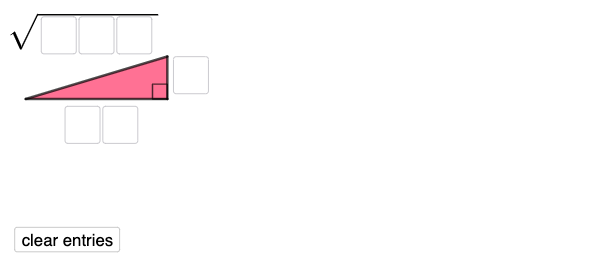
Loading the math board and drawing, please wait…
In collections
Open Middle: Pythagorean Theorem (2)
This example demonstrates how an isosceles triangle’s key geometric relationships can be built dynamically in the coordinate plane using symmetry. It emphasizes congruence reasoning: corresponding sides and angles are enforced through construction steps, while mirror transformations and angle/circle constraints guide the configuration. The core mathematics includes isosceles-triangle properties, congruence ideas, coordinate-geometry relationships between points and segments, and geometric constraints using angles and circles. In GeoGebra, the construction uses Textfield/InputBox-style parameter inputs, Polygon to form the triangle, Segment to connect defining points, Angle to measure/control the relevant angle(s), Circle to generate constraint loci, Point to create the dependent construction points, If to switch between conditional construction branches, Mirror to reflect points across a symmetry axis/line, and Intersect to compute intersection points that determine the final geometry. Suitable for middle/high-school geometry lessons, especially when teaching congruence, symmetry, and dynamic construction with GeoGebra.
GeoGebra Commands & Parameters
Textfield(a) → InputBox1Textfield(b) → InputBox2Textfield(c) → InputBox3Textfield(d) → InputBox4Textfield(f) → InputBox5Textfield(g) → InputBox6Polygon(A, B, C) → t1, c_1, a_1, b_1Segment(C, B) → hSegment(B, A) → iSegment(A, C) → jAngle(C, B, A) → αCircle(D, (10 * a) + b) → ePoint(e) → ECircle(E, c) → kSegment(D, E) → lIf(Length[Mode[l1]] ≟ 0, "No digits repeat!", "Repeated digits exist.") → text4Mirror(E, l) → E'Mirror(D, l) → D'Mirror(E, l) → E'_{1}Mirror(D, l) → D'_{1}Circle(D, sqrt((100 * d) + (10 * f) + g)) → qIntersect(k, q, 2) → FSegment(D, F) → mSegment(F, E) → nAngle(F, E, D) → βPolygon(D, E, F) → t2, f_1, d_1, e_1
AI Drawing Prompt Reference
Construct an isosceles triangle on a coordinate plane using parameter-defined defining points, drawing the triangle and its sides, and measuring the key angle at the appropriate vertex. Use a given segment as a symmetry axis to reflect points across this line, creating mirrored points that guide the configuration. Then generate constraint loci with circles and compute an intersection point from the circles, using that intersection to connect back to the original reflected point. Finally, form a resulting triangle by connecting the determined points so that the mirror relationship and angle/circle constraints jointly shape the isosceles geometry.
The prompt above was compiled from the original drawing commands and is for reference only.