
Perspective Projection of a 4-Cube
Loading the math board and drawing, please wait…
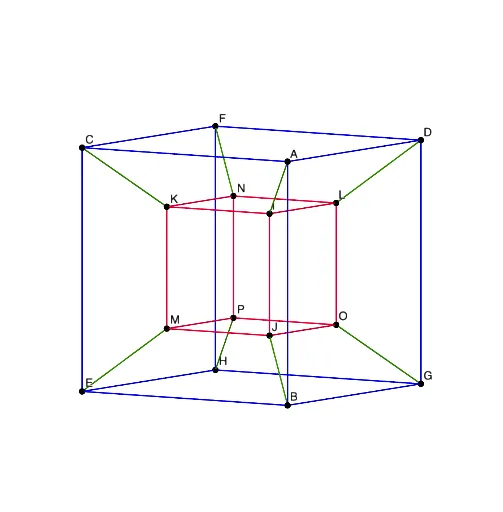
This example demonstrates the perspective projection of a 4-Cube (tesseract) into 3D space. It involves core mathematical concepts such as perspective projection, four-dimensional geometry, and solid geometry. The construction uses GeoGebra commands like Segment and objects including R, A, a, b, c, B, C, D, E, F, G, H, f, g, h, i, j, k, l, m, n, p, q, r, d, J, K, L, M, N, O, P, I, s, t, e, f_1, g_1, h_1, i_1. It is suitable for high school students and math enthusiasts studying higher-dimensional geometry and perspective projection principles.
GeoGebra Commands & Parameters
Segment(A, D) → fSegment(A, C) → gSegment(C, F) → hSegment(F, D) → iSegment(G, B) → jSegment(B, E) → kSegment(E, H) → lSegment(H, G) → mSegment(A, B) → nSegment(C, E) → pSegment(F, H) → qSegment(D, G) → rSegment(I, L) → sSegment(K, I) → tSegment(K, N) → eSegment(N, L) → f_1Segment(J, I) → g_1Segment(M, K) → h_1Segment(J, O) → i_1Segment(O, L) → j_1Segment(M, J) → k_1Segment(M, P) → l_1Segment(P, N) → m_1Segment(P, O) → n_1Segment(N, F) → p_1Segment(K, C) → q_1Segment(A, I) → r_1Segment(D, L) → s_1Segment(G, O) → t_1Segment(B, J) → a_1Segment(M, E) → b_1Segment(P, H) → c_1
AI Drawing Prompt Reference
Draw a perspective projection of a 4-cube (tesseract) into 3D space. Start with two nested cubes: an outer cube with eight vertices connected by twelve edges, and an inner cube also with eight vertices and twelve edges. Connect each inner vertex to its corresponding outer vertex with a straight line segment, creating eight connecting edges. All edges are straight lines, showing the 3D perspective view of the 4D hypercube.
The prompt above was compiled from the original drawing commands and is for reference only.