
Projections of a Rotating 3-Cube
Loading the math board and drawing, please wait…
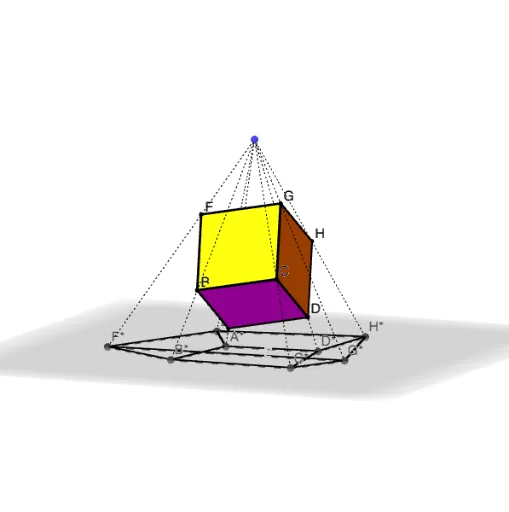
This example demonstrates the projections of a rotating 3-dimensional cube onto various planes. It involves core mathematical concepts such as solid geometry, projection transformations, and rotational motion. The construction uses GeoGebra commands like Cube, Plane, Segment, Line, and Intersect. It is suitable for high school students and above learning spatial geometry, visualization, and projection transformations, as well as for university-level introductory geometry courses.
GeoGebra Commands & Parameters
Cube(A2, B2, C2) → a, D, faceC2DHG, faceEFGH, edgeA2D, edgeA2B2, edgeB2C2, edgeC2D, edgeA2E, edgeDH, edgeEH, edgeEF, E, edgeB2F, edgeFG, edgeC2G, edgeGH, F, G, H, faceA2B2C2D, faceA2DHE, faceA2B2FE, faceB2C2GFPlane((1, 0, 0), (0, 1, 0), (1, 1, 0)) → ZSegment(A2, Ap) → fSegment(B2, Bp) → gSegment(C2, Cp) → iSegment(D, Dp) → jSegment(E, Ep) → kSegment(F, Fp) → lSegment(G, Gp) → mSegment(H, Hp) → nSegment(Ap, Bp) → pSegment(Bp, Cp) → qSegment(Cp, Dp) → rSegment(Ap, Dp) → sSegment(Ep, Fp) → tSegment(Fp, Gp) → bSegment(Gp, Hp) → cSegment(Ep, Hp) → dSegment(Dp, Hp) → eSegment(Ep, Ap) → f_1Segment(Fp, Bp) → g_1Segment(Cp, Gp) → h_1Line(S, A2) → LAIntersect(LA, Z) → apLine(S, B2) → LBIntersect(Z, LB) → bpLine(S, C2) → LCIntersect(Z, LC) → cpLine(S, D) → LDIntersect(Z, LD) → dpLine(S, E) → LEIntersect(LE, Z) → epLine(S, F) → LFIntersect(LF, Z) → fpLine(S, G) → LGIntersect(Z, LG) → gpLine(S, H) → LHIntersect(Z, LH) → hpSegment(S, ap) → i_1Segment(S, bp) → j_1Segment(S, cp) → k_1Segment(S, dp) → l_1Segment(S, ep) → m_1Segment(S, fp) → n_1Segment(S, gp) → p_1Segment(S, hp) → q_1Segment(ap, bp) → r_1Segment(bp, cp) → s_1Segment(cp, dp) → t_1Segment(dp, ap) → a_1Segment(hp, ep) → b_1Segment(ep, fp) → c_1Segment(fp, gp) → d_1Segment(gp, hp) → e_1Segment(ap, ep) → f_2Segment(dp, hp) → g_2Segment(gp, cp) → h_2Segment(fp, bp) → i_2
AI Drawing Prompt Reference
Draw a rotating 3D cube with its eight vertices projected onto a fixed plane, forming a projected octagon. First, construct the cube, then choose a horizontal plane as the projection plane. From each vertex of the cube, draw a perpendicular line to the plane, and mark the foot of each perpendicular as the projected point. Connect these projected points to form the projected polygon, while also keeping the lines from the original vertices to their projections and the lines between projected points to show the projection relationship. The overall effect demonstrates the projection transformation in solid geometry.
The prompt above was compiled from the original drawing commands and is for reference only.