
Perpendicular Lines Investigation
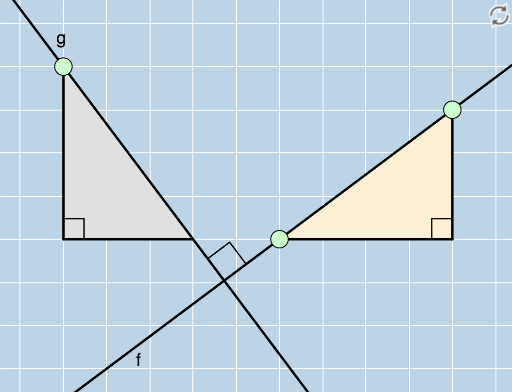
Loading the math board and drawing, please wait…
This example demonstrates how to draw and explore perpendicular lines in the coordinate plane. Key math concepts include intersection, straight lines, cosine, parallelogram, cube, geometric distribution, and unit circle. Construction highlights the use of GeoGebra commands and objects like Line, Intersect, Polygon, Segment, Angle, Slope, FractionText, Denominator, Numerator, and OrthogonalLine. Suitable for high school mathematics teaching to understand and apply properties of perpendicular lines in analytical geometry.
GeoGebra Commands & Parameters
Line(A, B) → fIntersect(g_2, h) → CPolygon(A, C, B) → poly1, b, a, cSegment(A, C) → iSegment(C, B) → jAngle(B, C, A) → αSlope(f) → d_1FractionText(d_1) → text1Denominator(d_1) → dNumerator(d_1) → nOrthogonalLine(D, f) → gIntersect(l, m) → FPolygon(D, F, E) → poly2, e, d_2, f_1Polygon(H, G, A) → poly3, a_1, h_1, g_1Segment(H, G) → pSegment(G, A) → qSegment(D, F) → rSegment(F, E) → sAngle(H, G, A) → βAngle(E, F, D) → γIntersect(f, g) → IAngle(B, I, D) → δ
AI Drawing Prompt Reference
Draw a straight line in the coordinate plane, then construct another line perpendicular to it. Mark their intersection point. Form a triangle using the intersection point and two points on the first line, and label one of its interior angles. Display the slope of the first line as a fraction, showing its numerator and denominator. From a point outside the first line, draw a perpendicular line to it, and use the foot of the perpendicular and another point to form a second triangle, labeling two of its angles. Construct a third triangle from three given points and label one of its angles. Finally, label the angle at the intersection of the two perpendicular lines to illustrate their perpendicularity.
The prompt above was compiled from the original drawing commands and is for reference only.