
Pentagon Interior & Exterior Angle Sum Theorems
Loading the math board and drawing, please wait…
In collections
Polygons & Angles
Polygons & Angles
Polygons & Angles ( s n attar)
Polygons & Angles
Polygons & Angles
Polygons & Angles
Polygons & Angles
Geometry: Polygons & Angles
Geometry: Polygons & Angles
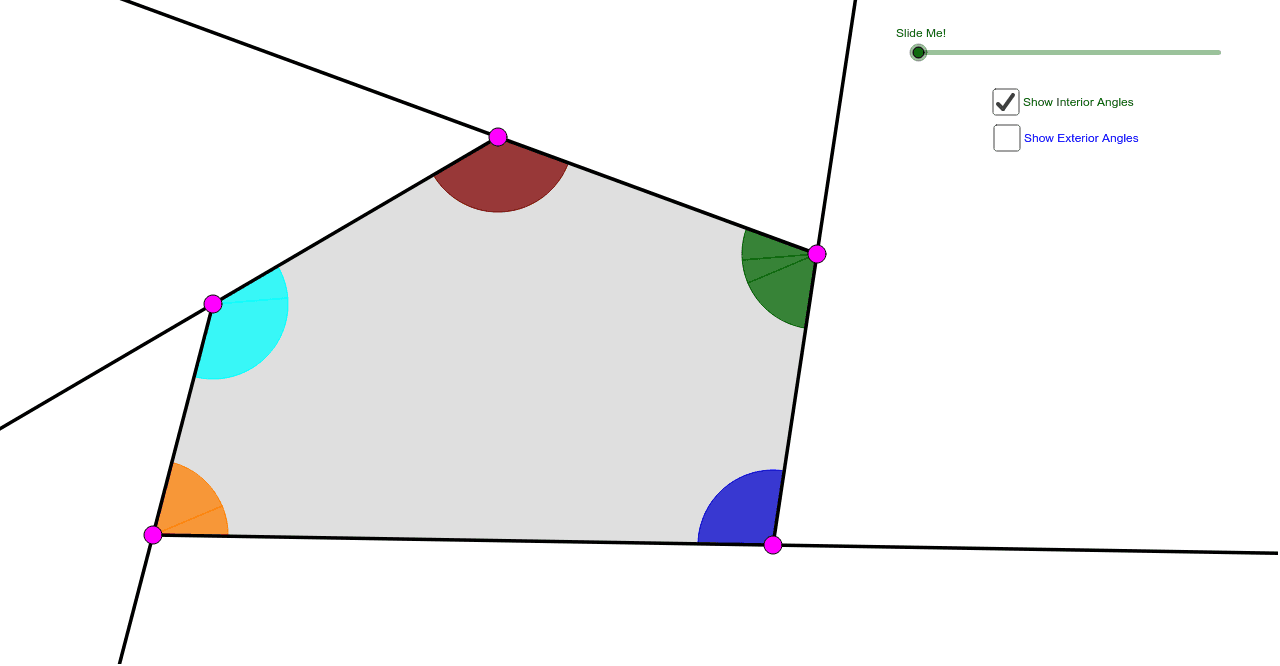
This GeoGebra applet informally illustrates to students that the sum of the measures of the interior angles of any pentagon is 540 degrees, and that the sum of the measures of the exterior angles is 360 degrees. It involves key mathematical concepts such as the interior and exterior angle sum theorems of a pentagon. Using commands like Ray, Circle, Segment, Intersect, students can dynamically explore the properties of pentagons. Suitable for middle school and above students learning geometry.
GeoGebra Commands & Parameters
Ray(A, B) → aRay(B, C) → bRay(C, D) → cRay(D, E) → dRay(E, A) → eCircle(A, 1.5) → fCircle(B, 1.5) → gCircle(C, 1.5) → hCircle(D, 1.5) → kCircle(E, 1.5) → pSegment(C, A) → iSegment(C, E) → jIntersect(f, a, 1) → FIntersect(f, i, 1) → GIntersect(f, e, 1) → HIntersect(f, e, 2) → IIntersect(p, e) → J,Intersect(p, j) → K,Intersect(p, d, 1) → LIntersect(p, d, 2) → MIntersect(k, d, 1) → NIntersect(k, c, 2) → OIntersect(h, c, 1) → PIntersect(h, j, 1) → QIntersect(h, i, 1) → RIntersect(h, b, 1) → SIntersect(g, a, 2) → TIntersect(g, b, 1) → UIntersect(g, a, 1) → VCircleSector(A, F, G) → qCircleSector(A, G, H) → rCircleSector(B, U, V) → sCircleSector(C, P, Q) → tCircleSector(C, Q, R) → c_1CircleSector(C, R, S) → d_1Intersect(k, c, 1) → WCircleSector(D, O, N) → e_1CircleSector(D, N, W) → f_1CircleSector(E, M, J) → g_1CircleSector(E, J, K) → h_1CircleSector(E, K, L) → k_1CircleSector(A, I, F) → p_1CircleSector(B, T, U) → q_1Intersect(h, b, 2) → ZCircleSector(C, Z, P) → r_1Vector(A, B) → uVector(C, B) → vVector(E, D) → wVector(C, D) → u_1Vector(C, E) → v_1Vector(A, E) → w_1Translate(q, u) → q'Translate(d_1, v) → s_1Mirror(s_1, B) → t_1Dilate(A, If[0 < l ≤ 1, 1 - l, 0], B) → A'Dilate(C, If[0 < l ≤ 1, 1 - l, 0], B) → C'Dilate(A, If[1 < l ≤ 2, 2 - l, 0], E) → A'_1Dilate(C, If[1 < l ≤ 2, 2 - l, 0], E) → C'_1Dilate(C, If[2 < l ≤ 3, 3 - l, 0], D) → C'_2Dilate(E, If[2 < l ≤ 3, 3 - l, 0], D) → E'Vector(A, B) → a_1Vector(C, C') → b_1Vector(A, A'_1) → i_1Vector(E, E') → j_1Vector(C, C'_2) → l_1Vector(C, C'_1) → m_1Translate(d_1, b_1) → c_2Translate(r, i_1) → r'_1Translate(r, w_1) → r'_2Translate(k_1, w) → d_2Translate(k_1, j_1) → e_2Translate(c_1, v_1) → f_2Translate(c_1, m_1) → g_2Translate(t, u_1) → t'Translate(t, l_1) → t'_1Translate(q, a_1) → r'Translate(d_1, b_1) → h_2If(0 < l < 1, Rotate[h_2, ((l * 180))°, C']) → k_2Vector(A, A') → n_1Translate(q, n_1) → q'_1Mirror(r'_2, E) → p_2If(1 < l < 2, Rotate[r'_1, (((l - 1) * 180))°, A'_1]) → q_2Line(E, C) → a_2Mirror(t', D) → t''Line(E, D) → b_2Segment(E, C) → i_2If(2 < l < 3, Rotate[t'_1, (((l - 2) * 180))°, C'_2]) → r_2Line(E, D) → j_2Vector(D, C) → u_2Vector(E, C) → v_2Vector(A, C) → w_2Vector(B, C) → l_2Dilate(B, If[0 < o < 1, 1 - o, 0], C) → B'Dilate(A, If[1 < o < 2, 2 - o, 0], C) → A'_2Dilate(E, If[2 < o < 3, 3 - o, 0], C) → E'_1Dilate(D, If[3 < o < 4, 4 - o, 0], C) → D'Vector(B, B') → m_2Vector(A, A'_2) → n_2Vector(E, E'_1) → s_2Vector(D, D') → t_2Translate(q_1, m_2) → c_3Translate(q_1, l_2) → d_3Translate(p_1, w_2) → e_3Translate(g_1, v_2) → f_3Translate(e_1, u_2) → g_3If(1 < o < 2, Translate[p_1, n_2]) → h_3If(2 < o < 3, Translate[g_1, s_2]) → k_3If(3 < o < 4, Translate[e_1, t_2]) → p_3Point(a_2) → A_1Point(a_2) → B_1Ray(C, B_1) → a_3Ray(E, A_1) → b_3Polygon(A, B, C, D, E) → poly1, a_4, b_4, c_4, d_4, e_4Polygon(A, B, C) → poly2, c_5, a_5, b_5Polygon(A, C, E) → poly3, e_5, a_6, c_6Polygon(E, C, D) → poly4, d_5, e_6, c_7
AI Drawing Prompt Reference
Draw a pentagon ABCDE by intersecting circles centered at A, B, C, D, and E with radii of 1.5 to form the vertices. Connect these vertices to form the sides of the pentagon. Use the arc command to create the interior and exterior angles of the pentagon by connecting adjacent vertices with arcs centered at each vertex. Finally, use the vector command to draw vectors AB, BC, and ED.
The prompt above was compiled from the original drawing commands and is for reference only.