
Pythagorean Theorem via Similar Parallelograms (Dynamic & Modifiable)
Loading the math board and drawing, please wait…
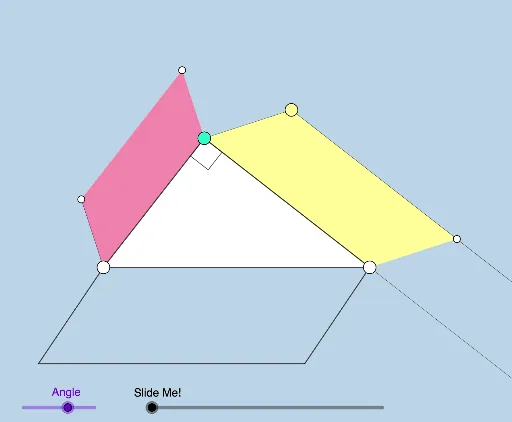
① This interactive GeoGebra example demonstrates a geometric proof of the Pythagorean theorem by constructing similar parallelograms on the three sides of a right triangle, showing that the sum of the areas of the two smaller parallelograms equals the area of the larger one. ② Core mathematical concepts include the Pythagorean theorem, similarity, area relationships, parallelogram properties, and dilation transformations. ③ Construction highlights: using GeoGebra commands such as Semicircle, Point, Polygon, Rotate, Ray, Circle, Intersect, Line, Midpoint, OrthogonalLine, Dilate, Vector, Translate, Segment, Angle, and Distance, the applet builds a right triangle and similar parallelograms on each side, with dynamic sliders or draggable points to modify the shape and observe area changes in real time. ④ Suitable for middle and high school geometry classes, dynamic proof demonstrations, and exploratory learning of area-based proofs and similarity.
GeoGebra Commands & Parameters
Semicircle(A, B) → cPoint(c) → CPolygon(A, C, B) → t1, b, a, c_1Rotate(B, (d * π / 180), C) → B'Ray(C, B') → fRotate(C, (d * π / 180), A) → C'Ray(A, C') → gRotate(A, (d * π / 180), B) → A'Ray(B, A') → hPoint(Segment[C, B']) → DCircle(A, (e * Distance[A, C'])) → kCircle(B, (e * Distance[B, A'])) → pIntersect(k, g, 1) → EIntersect(p, h, 1) → FLine(D, a) → iLine(E, b) → jLine(F, c_1) → lLine(B, f) → mLine(A, h) → nLine(C, g) → qIntersect(j, q) → GIntersect(i, m) → HIntersect(l, n) → IPolygon(A, E, G, C) → q1, a_1, e_1, g_1, c_2Polygon(C, D, H, B) → q2, c_3, d_1, h_1, b_1Polygon(B, F, I, A) → q3, b_2, f_1, i_1, a_2Intersect(f_1, i_1) → JMidpoint(I, B) → KMidpoint(A, G) → LMidpoint(C, H) → MOrthogonalLine(C, a_2) → rRay(B, H) → sIntersect(r, a_2) → NOrthogonalLine(D, b_1) → tIntersect(b_1, t) → OLine(D, H) → j_1Line(C, B) → k_1Circle(B, i_1) → p_1Intersect(p_1, j_1, 2) → PDilate(H, If[0 < u ≤ 1, 1 - u, 0], P) → H'Vector(H, H') → vTranslate(D, v) → D'Polygon(C, B, H', D') → q4, c_4, b_3, h', d'Line(C, D') → l_1Line(I, F) → m_1Line(N, h) → n_1Intersect(m_1, n_1) → QSegment(N, Q) → r_1Segment(B, P) → s_1Polygon(Q, F, B, N) → q5, q_2, f_2, b_4, n_2Circle(B, b_4) → q_1Intersect(q_1, l_1, 1) → RDilate(C, If[2 < u ≤ 3, 3 - u, 0], R) → C'_1Vector(C, C'_1) → wTranslate(D', w) → D''Polygon(B, P, D'', C'_1) → q6, b_5, p_2, d'', c'_1Midpoint(Q, B) → SAngle(R, B, N) → αRotate(B, If[4 < u ≤ 5, ((u - 4) * α), α], B) → B'_1Rotate(P, If[4 < u ≤ 5, ((u - 4) * α), α], B) → P'Rotate(D'', If[4 < u ≤ 5, ((u - 4) * α), α], B) → D'''Rotate(C'_1, If[4 < u ≤ 5, ((u - 4) * α), α], B) → TPolygon(B'_1, P', D''', T) → q6', b'_1, p', d''', t_1Dilate(N, If[5 < u ≤ 6, 6 - u, 0], Q) → N'Vector(N, N') → u_1Translate(B'_1, u_1) → UTranslate(P', u_1) → P''Translate(D''', u_1) → VTranslate(T, u_1) → T'Polygon(U, P'', V, T') → q6'', u_2, p'', v_1, t'Line(A, C) → g_2Line(E, G) → h_2Circle(C, Distance[A, J]) → d_2Intersect(d_2, h_2, 2) → WDilate(G, If[7 < u ≤ 8, 8 - u, 0], W) → G'Vector(G, G') → w_1Translate(E, w_1) → E'Polygon(A, C, G', E') → q7, a_3, c_5, g', e'Circle(W, Distance[A, V]) → e_2Distance(C, W) → distanceCWDistance(A, I) → distanceAILine(C, W) → i_2Circle(W, Distance[A, V]) → k_2Intersect(k_2, j_1, 1) → A_1Line(A, i_2) → j_2Intersect(j_2, h_2) → B_1Intersect(k_2, j_2, 1) → C_1Dilate(B_1, If[9 < u ≤ 10, 10 - u, 0], C_1) → D_1Vector(B_1, D_1) → v_2Translate(A, v_2) → A'_1Polygon(C, A'_1, D_1, W) → q8, l_2, m_2, r_2, s_2Dilate(A'_1, If[11 < u ≤ 12, 12 - u, 0], A) → E_1Vector(A'_1, E_1) → w_2Translate(C, w_2) → C'_2Translate(A'_1, w_2) → F_1Translate(D_1, w_2) → G_1Translate(W, w_2) → W'Polygon(C'_2, F_1, G_1, W') → q8', c'_2, t_2, f_3, w'Line(E_1, C'_2) → g_3Line(E_1, b_4) → h_3Point(h_3) → H_1Angle(H_1, E_1, C'_2) → βDistance(E_1, C'_2) → distanceE1C'2Distance(A, N) → distanceANRotate(C'_2, If[12 < u < 13, ((-(u - 12)) * β), (-β)], F_1) → I_1Rotate(F_1, If[12 < u < 13, ((-(u - 12)) * β), (-β)], F_1) → J_1Rotate(G_1, If[12 < u < 13, ((-(u - 12)) * β), (-β)], F_1) → K_1Rotate(W', If[12 < u < 13, ((-(u - 12)) * β), (-β)], F_1) → W''Polygon(I_1, J_1, K_1, W'') → q8'', i_3, j_3, k_3, w''Dilate(A, If[13 < u ≤ 14, 14 - u, 0], J) → A'_2Vector(A, A'_2) → u_3Translate(I_1, u_3) → L_1Translate(J_1, u_3) → M_1Translate(K_1, u_3) → N_1Translate(W'', u_3) → W'''Polygon(L_1, M_1, N_1, W''') → q8''', l_3, m_3, n_3, w'''Ray(E, G) → p_3Ray(D, H) → q_3Ray(C, B) → r_3Ray(A, C) → s_3Ray(C, D') → t_3Ray(B, H') → d_3Segment(A, E) → e_3Ray(A, B_1) → f_4Ray(C, W) → g_4Segment(C, D) → h_4Angle(A, C, B) → γPolygon(A, C, B) → t2, b_6, a_4, c_6Segment(A, I) → i_4Segment(I, F) → j_4Segment(F, B) → k_4Segment(B, A) → l_4Segment(C, B) → m_4Segment(C, A) → n_4
AI Drawing Prompt Reference
Draw a right triangle with the hypotenuse as the diameter of a semicircle, and place a point on the arc to form the right angle vertex. Construct three similar parallelograms outward on each side of the triangle, such that the sum of the areas of the two smaller ones equals the area of the largest. Use rotating rays and circles to determine the parallelogram vertices, and include draggable points or sliders to adjust angles and proportions dynamically, showing area changes in real time. Finally, mark the right angle and key segments to illustrate the area relationship.
The prompt above was compiled from the original drawing commands and is for reference only.