
Pattern Block Symmetry
Loading the math board and drawing, please wait…
In collections
Symmetry Explorations
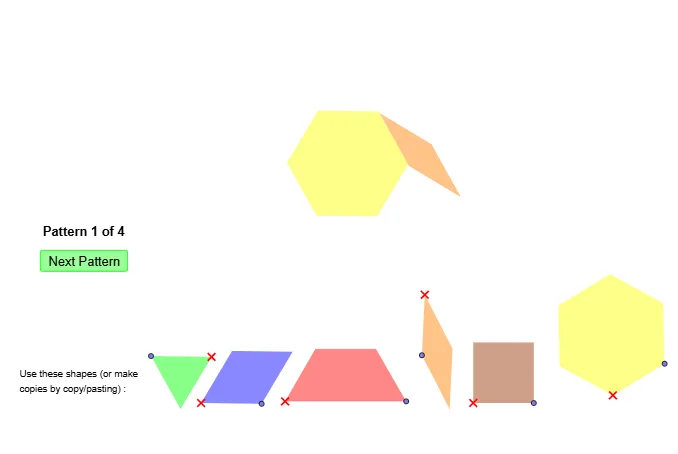
This example demonstrates how to create symmetrical shapes based on a given pattern. It involves core math concepts like symmetry, variance, congruence, circumcircle, cuboid, and coordinate geometry. Construction highlights include using GeoGebra commands such as Point, Segment, Polygon, Rotate, Angle, Circle, Intersect, and Midpoint. Suitable for middle school and above students exploring geometric symmetry.
GeoGebra Commands & Parameters
Point(Circle[A, a]) → BSegment(A, B) → fPolygon(A, B, 6) → poly1, g, F, h, i, j, k, l, C, D, EPoint(Circle[G, a]) → HSegment(G, H) → mPolygon(G, H, 3) → poly2, n, p, q, IPoint(Circle[J, a]) → KSegment(J, K) → rPolygon(J, K, 3) → poly3, s, t, b, LPolygon(L, K, 3) → poly4, c, d, e, MPolygon(J, K, M, L) → poly5, j_1, k_1, m_1, l_1Point(Circle[S, a]) → TSegment(S, T) → a_1Polygon(S, T, 4) → poly10, b_1, c_1, d_1, e_1, U, VPoint(Circle[W, a]) → ZSegment(W, Z) → f_2Rotate(Z, 30°, W) → Z'Angle(Z, W, Z') → αCircle(Z, W) → c_2Circle(Z', W) → d_2Intersect(c_2, d_2, 2) → A_1Polygon(W, Z, A_1, Z') → poly11, w, z_1, a_2, z'Point(Circle[A_2, a]) → B_1Segment(A_2, B_1) → f_3Polygon(A_2, B_1, 6) → poly1_1, g_2, F_1, h_2, i_2, j_2, k_2, l_2, C_1, D_1, E_1Point(Circle[W_1, a]) → Z_1Segment(W_1, Z_1) → f_4Rotate(Z_1, 30°, W_1) → Z'_1Angle(Z_1, W_1, Z'_1) → α_1Circle(Z_1, W_1) → c_3Circle(Z'_1, W_1) → d_3Intersect(c_3, d_3, 2) → A_3Point(Circle[W_2, a]) → Z_2Segment(W_2, Z_2) → f_5Rotate(Z_2, 30°, W_2) → Z'_2Angle(Z_2, W_2, Z'_2) → α_2Circle(Z_2, W_2) → c_4Circle(Z'_2, W_2) → d_4Intersect(c_4, d_4, 2) → A_4Polygon(W_2, Z_2, A_4, Z'_2) → poly11_1, w_1, z_2, a_3, z'_1Point(Circle[G_1, (2 * a)]) → H_1Segment(G_1, H_1) → m_2Polygon(G_1, H_1, 3) → poly12, s_2, t_2, b_2, I_1Midpoint(G_1, I_1) → J_1Midpoint(H_1, I_1) → K_1Polygon(G_1, H_1, K_1, J_1) → poly13, g_3, h_3, k_3, j_3Point(Circle[G_2, (2 * a)]) → H_2Segment(G_2, H_2) → m_3Polygon(G_2, H_2, 3) → poly12_1, s_3, t_3, b_3, I_2Midpoint(G_2, I_2) → J_2Midpoint(H_2, I_2) → K_2Polygon(G_2, H_2, K_2, J_2) → poly13_1, g_4, h_4, k_4, j_4Point(Circle[G_3, a]) → H_3Segment(G_3, H_3) → m_4Polygon(G_3, H_3, 3) → poly2_1, n_1, p_1, q_1, I_3Point(Circle[J_3, a]) → K_3Segment(J_3, K_3) → r_1Polygon(J_3, K_3, 3) → poly3_1, s_1, t_1, b_4, L_1Polygon(L_1, K_3, 3) → poly4_1, c_5, d_5, e_2, M_1Polygon(J_3, K_3, M_1, L_1) → poly5_1, j_5, k_5, m_5, l_3Point(Circle[W_3, a]) → Z_3Segment(W_3, Z_3) → f_1Rotate(Z_3, 30°, W_3) → Z'_3Angle(Z_3, W_3, Z'_3) → α_3Circle(Z_3, W_3) → c_6Circle(Z'_3, W_3) → d_6Intersect(c_6, d_6, 2) → A_5Polygon(W_3, Z_3, A_5, Z'_3) → poly11_2, w_2, z_3, a_4, z'_2Point(Circle[G_4, (2 * a)]) → H_4Segment(G_4, H_4) → m_6Polygon(G_4, H_4, 3) → poly12_2, s_4, t_4, b_5, I_4Midpoint(G_4, I_4) → J_4Midpoint(H_4, I_4) → K_4Polygon(G_4, H_4, K_4, J_4) → poly13_2, g_1, h_1, k_6, j_6Point(Circle[J_5, a]) → K_5Segment(J_5, K_5) → r_2Polygon(J_5, K_5, 3) → poly3_2, s_5, t_5, b_6, L_2Polygon(L_2, K_5, 3) → poly4_2, c_7, d_7, e_3, M_2Polygon(J_5, K_5, M_2, L_2) → poly5_2, j_7, k_7, m_7, l_4
AI Drawing Prompt Reference
Create a symmetric pattern composed of multiple geometric shapes. Start with a regular hexagon based on a point on a circle. Then add a regular triangle adjacent to it, followed by two more triangles sharing sides to form a rhombus-like arrangement. Construct a square, and a rhombus formed by two intersecting circles and a rotated point. Repeat these elements: another hexagon, two rhombi, and a larger triangle. Inside the larger triangle, connect midpoints to form a quadrilateral. Arrange all shapes symmetrically around a central axis for a balanced, mirrored composition.
The prompt above was compiled from the original drawing commands and is for reference only.