
Parametric Heart Surface
Loading the math board and drawing, please wait…
In collections
Curves and Surfaces
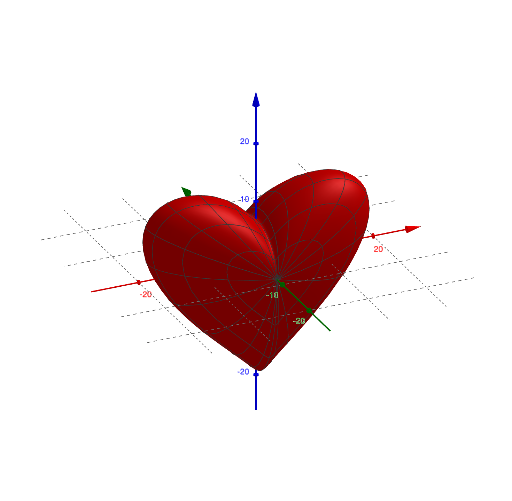
This example demonstrates a heart-shaped surface generated by parametric equations. Key mathematical concepts include parametric equations and solid geometry. The Surface command is used to construct the heart-shaped surface, with parameters a and opacity control. Suitable for high school and above students learning parametric equations and solid geometry.
GeoGebra Commands & Parameters
Surface((sin(v) * ((15 * sin(u)) - (4 * sin((3 * u))))), (8 * cos(v)), (sin(v) * ((15 * cos(u)) - (5 * cos((2 * u))) - (2 * cos((3 * u))) - cos((2 * u)))), u, 0, (2 * π), v, 0, π) → a
AI Drawing Prompt Reference
Create a heart-shaped surface in 3D using parametric equations with two parameters u and v. Define a point (x, y, z) where x and z are both products involving sin(v) and trigonometric combinations of u (including sin(u), sin(3u) and corresponding cosine terms), while the y-coordinate is given by 8*cos(v). Use u from 0 to 2π and v from 0 to π to form the full surface patch. Render it as a solid-looking surface with a controllable opacity so it appears translucent, showing the heart surface clearly.
The prompt above was compiled from the original drawing commands and is for reference only.