
Parametric Curves for 0 < r < 1
Loading the math board and drawing, please wait…
In collections
ATC Cobwebs and Linear Difference Equations
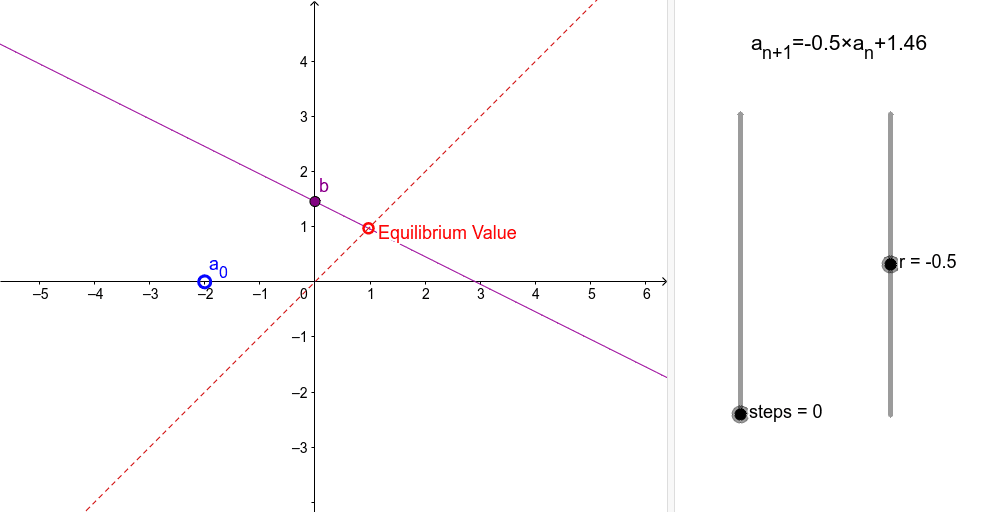
This example demonstrates parametric curves for the range 0 < r < 1. It involves key mathematical concepts such as parametric equations and vectors. Using commands like Point, Segment, and Intersect, users can construct a series of points and curves. This example is suitable for high school mathematics education, particularly in coordinate geometry and parametric equations.
GeoGebra Commands & Parameters
Point(yAxis) → CPoint(xAxis) → ASegment(A, (x(A), f(x(A)))) → cSegment((A1, A2), (A2, A2)) → B1Segment((A2, A2), (A2, A3)) → C1Segment((A2, A3), (A3, A3)) → B2Segment((A3, A3), (A3, A4)) → C2Segment((A3, A4), (A4, A4)) → B3Segment((A4, A4), (A4, A5)) → C3Segment((A4, A5), (A5, A5)) → B4Segment((A5, A5), (A5, A6)) → C4Segment((A5, A6), (A6, A6)) → B5Segment((A6, A6), (A6, A7)) → C5Segment((A6, A7), (A7, A7)) → B6Segment((A7, A7), (A7, A8)) → C6Segment((A7, A8), (A8, A8)) → B7Segment((A8, A8), (A8, A9)) → C7Segment((A8, A9), (A9, A9)) → B8Segment((A9, A9), (A9, A10)) → C8Segment((A9, A10), (A10, A10)) → B9Segment((A10, A10), (A10, A11)) → C9Segment((A10, A11), (A11, A11)) → B10Segment((A11, A11), (A11, A12)) → C10Segment((A11, A12), (A12, A12)) → B11Segment((A12, A12), (A12, A13)) → C11Segment((A12, A13), (A13, A13)) → B12Segment((A13, A13), (A13, A14)) → C12Segment((A13, A14), (A14, A14)) → B13Segment((A14, A14), (A14, A15)) → C13Segment((A14, A15), (A15, A15)) → B14Segment((A15, A15), (A15, A16)) → C14Segment((A15, A16), (A16, A16)) → B15Segment((A16, A16), (A16, A17)) → C15Segment((A16, A17), (A17, A17)) → B16Segment((A17, A17), (A17, A18)) → C16Segment((A17, A18), (A18, A18)) → B17Segment((A18, A18), (A18, A19)) → C17Segment((A18, A19), (A19, A19)) → B18Segment((A19, A19), (A19, A20)) → C18Segment((A19, A20), (A20, A20)) → B19Segment((A20, A20), (A20, A21)) → C19Segment((A20, A21), (A21, A21)) → B20Segment((A21, A21), (A21, A22)) → C20Segment((A21, A22), (A22, A22)) → B21Segment((A22, A22), (A22, A23)) → C21Segment((A22, A23), (A23, A23)) → B22Segment((A23, A23), (A23, A24)) → C22Segment((A23, A24), (A24, A24)) → B23Segment((A24, A24), (A24, A25)) → C23Segment((A24, A25), (A25, A25)) → B24Segment((A25, A25), (A25, A26)) → C24Segment((A25, A26), (A26, A26)) → B25Segment((A26, A26), (A26, A27)) → C25Segment((A26, A27), (A27, A27)) → B26Segment((A27, A27), (A27, A28)) → C26Segment((A27, A28), (A28, A28)) → B27Segment((A28, A28), (A28, A29)) → C27Segment((A28, A29), (A29, A29)) → B28Segment((A29, A29), (A29, A30)) → C28Segment((A29, A30), (A30, A30)) → B29Segment((A30, A30), (A30, A31)) → C29Segment((A30, A31), (A31, A31)) → B30Segment((A31, A31), (A31, A32)) → C30Segment((A31, A32), (A32, A32)) → B31Segment((A32, A32), (A32, A33)) → C31Segment((A32, A33), (A33, A33)) → B32Segment((A33, A33), (A33, A34)) → C32Segment((A33, A34), (A34, A34)) → B33Segment((A34, A34), (A34, A35)) → C33Segment((A34, A35), (A35, A35)) → B34Segment((A35, A35), (A35, A36)) → C34Segment((A35, A36), (A36, A36)) → B35Segment((A36, A36), (A36, A37)) → C35Segment((A36, A37), (A37, A37)) → B36Segment((A37, A37), (A37, A38)) → C36Segment((A37, A38), (A38, A38)) → B37Segment((A38, A38), (A38, A39)) → C37Segment((A38, A39), (A39, A39)) → B38Segment((A39, A39), (A39, A40)) → C38Intersect(f, b) → B
AI Drawing Prompt Reference
Draw parametric curves for the range 0 to 1. Start by creating point C on the y-axis and point A on the x-axis. Then draw a series of line segments from point A, each segment extending further to the right and upwards, with the length of each segment gradually increasing.
The prompt above was compiled from the original drawing commands and is for reference only.