
Parametric Bézier Curve Demo
Loading the math board and drawing, please wait…
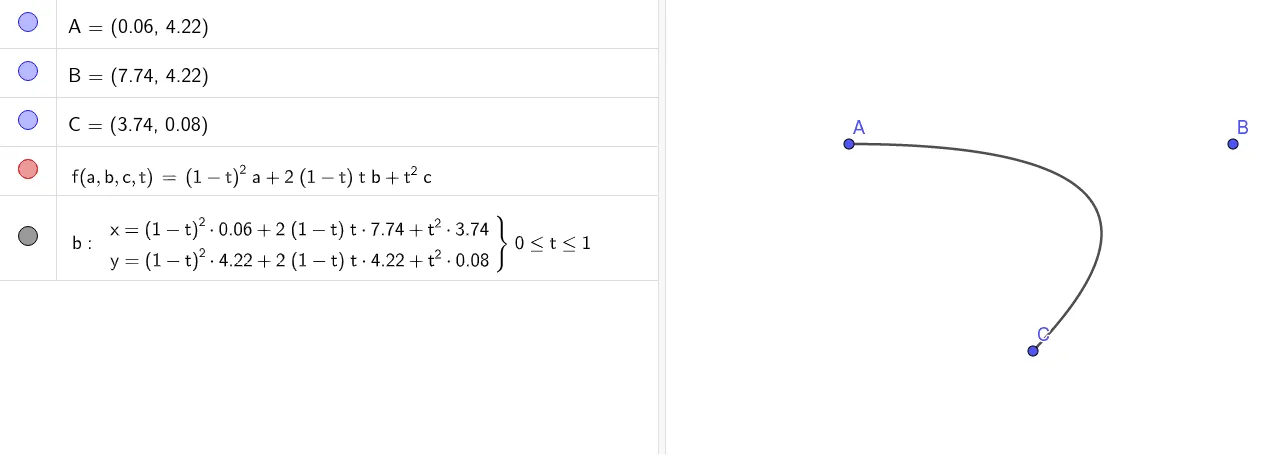
This example demonstrates how to draw a Bézier curve using parametric equations, showcasing the generation process and dynamic changes of the curve. Core mathematical concepts include parametric equations, Bézier curves, and coordinate geometry. The construction uses the GeoGebra command CurveCartesian to plot the curve, with points A, B, C as control points and f, b as parameters. Suitable for high school and above learners to understand the drawing and properties of parametric curves, ideal for teaching demonstrations and geometric exploration.
GeoGebra Commands & Parameters
CurveCartesian(f(x(A), x(B), x(C), t), f(y(A), y(B), y(C), t), t, 0, 1) → b
AI Drawing Prompt Reference
Draw a parametric Bézier curve. Choose three planar control points A, B, and C. Using their coordinates, define the curve’s x- and y-components by parametric expressions built from the x(A), x(B), x(C) and y(A), y(B), y(C) values together with a parameter t. Plot the resulting parametric trajectory as t varies continuously from 0 to 1 to obtain the Bézier curve.
The prompt above was compiled from the original drawing commands and is for reference only.