
Parallelogram Area: Dynamic Cut-and-Paste Demonstration
Loading the math board and drawing, please wait…
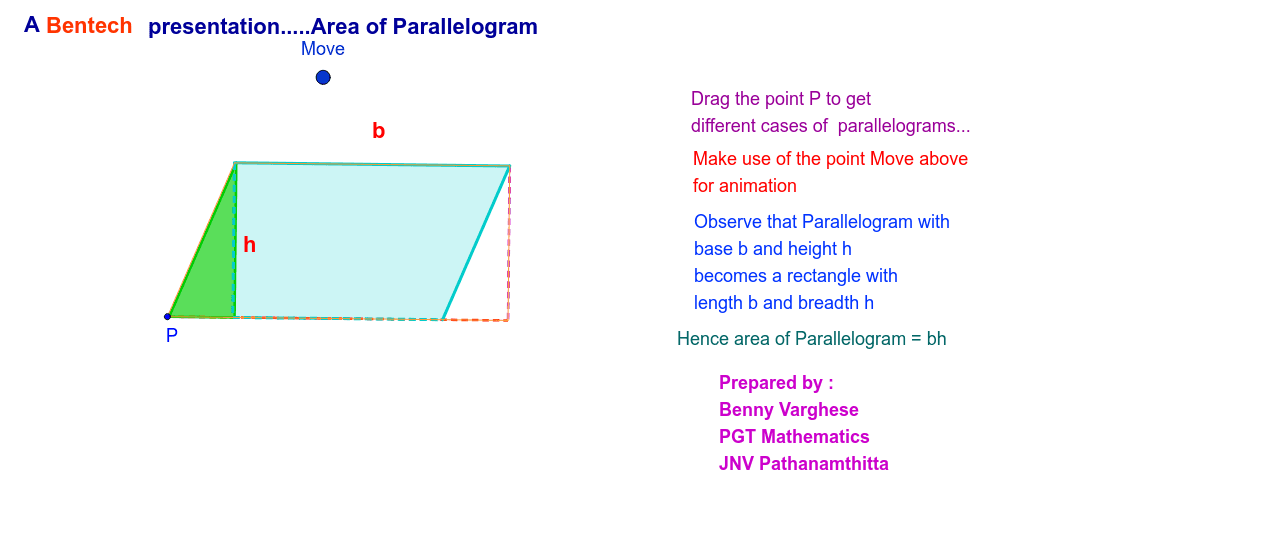
①This GeoGebra example dynamically demonstrates the area of a parallelogram by using a cut-and-paste (dissection) method, transforming the parallelogram into a rectangle to visually verify the area formula. ②Core mathematical concepts include properties of parallelograms, area formula (base × height), geometric transformations (translation, rotation), and conservation of area. ③Construction highlights: uses Line, OrthogonalLine to create parallel and perpendicular lines, Intersect for points, Angle for angle marking, Point, Vector, Translate for moving parts, Polygon, Segment for shapes, Midpoint for midpoints; Move and sliders control the dynamic dissection, showing area invariance. ④Suitable for middle school geometry or high school review, helping students understand the origin of the area formula, and useful for classroom demonstrations or self-study.
GeoGebra Commands & Parameters
Line(N, B) → aLine(P, a) → blLine(N, P) → cLine(B, c) → dOrthogonalLine(N, bl) → eOrthogonalLine(B, bl) → fIntersect(e, bl) → DIntersect(d, bl) → EIntersect(f, bl) → FAngle(N, P, D) → α_1Point(bl) → HPoint(bl) → IVector(H, I) → uTranslate(N, u) → A'Translate(D, u) → D'Translate(P, u) → C'Polygon(A', D', C') → poly1', c', a', d'Segment(B, F) → gSegment(B, E) → heLine(J, bl) → iPoint(i) → MovePolygon(N, P, F, B) → poly1, a_1, α_2, f_1, b_1Vector(J, Move) → vTranslate(A', v) → A''Translate(D', v) → D''Translate(C', v) → C''Polygon(A'', D'', C'') → poly1'', c'', a'', d''Polygon(N, D, E, B) → poly2, a_2, d_1, e_1, b_2Polygon(N, P, F, B) → poly3, a_3, c_2, f_2, b_3Midpoint(N, B) → CMidpoint(N, D) → G