
Area of Trapezium: Dynamic Geometry Construction
Loading the math board and drawing, please wait…
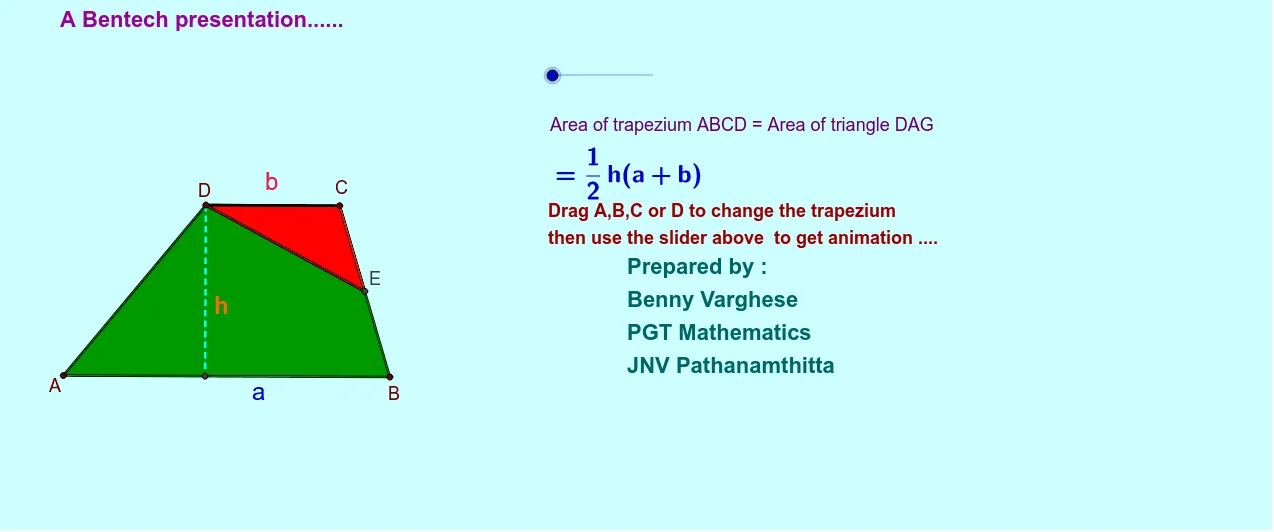
①This GeoGebra example demonstrates the area of a trapezium through an interactive geometric construction, linking it with related shapes like ellipses and polygons. ②Core mathematical concepts include the trapezium area formula (half the sum of parallel sides times height), polygon area, geometric transformations such as midpoint and rotation, as well as random variables and step functions used in dynamic visualization. ③Construction highlights: based on the summary, commands such as Segment, Line, Point, Midpoint, Rotate, Polygon, OrthogonalLine, and Intersect are used to create multiple objects (A, B, D, C, E, G, etc.), with text objects (text1 to text4) displaying area values, enabling dynamic calculation and adjustment of the area. ④This is suitable for middle and high school geometry lessons, helping students understand the derivation of the trapezium area formula, and also serves as a reference for teachers creating dynamic courseware.
GeoGebra Commands & Parameters
Segment(A, B) → alLine(D, al) → blSegment(D, A) → cPoint(bl) → CSegment(C, B) → eMidpoint(C, B) → ESegment(D, E) → fSegment(D, C) → dRotate(D, -1.0 * α, E) → GRotate(C, -1.0 * α, E) → D'Segment(G, E) → gSegment(D', E) → heSegment(G, D') → iPolygon(D, A, B, E) → poly1, c_1, a_1, b_1, e_1Polygon(D, C, E) → poly2, e_2, c_2, d_1Polygon(E, D', G) → poly3, c', e_3, d'OrthogonalLine(D, al) → jIntersect(j, al) → FSegment(D, F) → kPoint(al) → HMidpoint(D, F) → IMidpoint(D, C) → JMidpoint(B, G) → KMidpoint(i) → L
AI Drawing Prompt Reference
Draw a dynamic geometric construction showing the area of a trapezium, linked with ellipses and polygons. Use a slider to adjust parameters dynamically, displaying area values. Start by drawing the trapezium's sides and parallel edges, find midpoints and perpendicular lines, construct rotations and intersection points to form multiple polygons, and label the area values to demonstrate the formula derivation.
The prompt above was compiled from the original drawing commands and is for reference only.