
Overlapped David Star
Loading the math board and drawing, please wait…
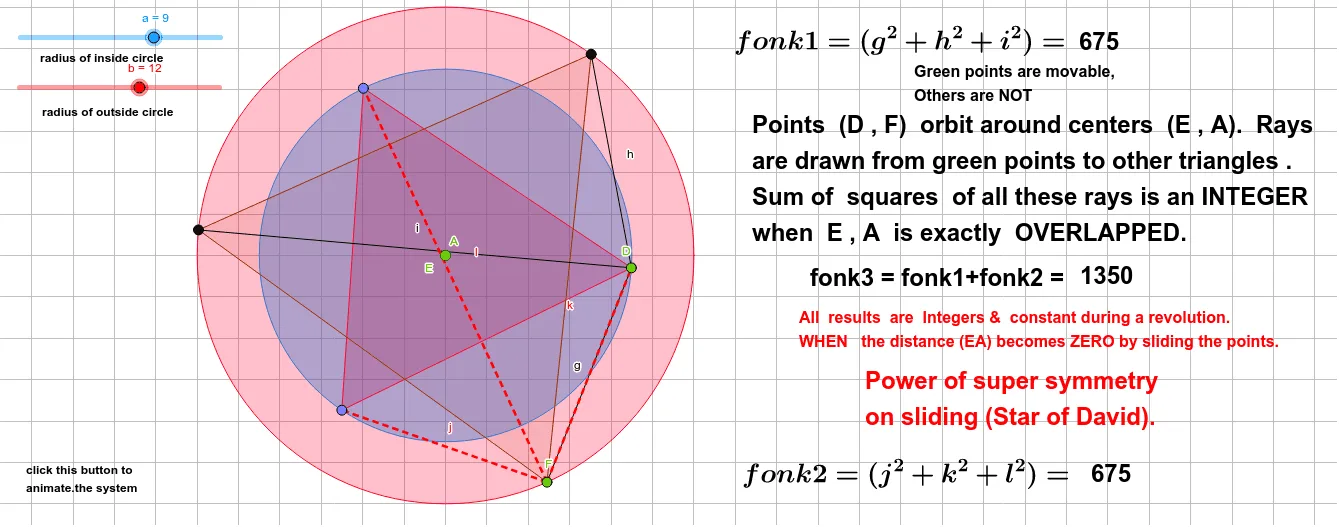
This example demonstrates an overlapped David star. It involves the concept of geometric transformations, constructed using GeoGebra commands such as Circle, Point, Rotate, Polygon, and Segment. Suitable for middle school and above students to learn geometric transformations and construction.
GeoGebra Commands & Parameters
Circle(A, a) → cPoint(c) → DRotate(D, 120°, A) → D'Rotate(D', 120°, A) → D''Polygon(D', D, D'') → t1, d'', d', dCircle(E, b) → ePoint(e) → FRotate(F, 120°, E) → TRotate(T, 120°, E) → MPolygon(T, F, M) → t2, f'', f', fSegment(D, F) → gSegment(D, T) → hSegment(D, M) → iSegment(F, D'') → jSegment(F, D) → kSegment(F, D') → l
AI Drawing Prompt Reference
Draw an overlapped pentagram: first, draw a circle and pick a point D, then rotate D around point A to get D' and D''. Connect D', D, and D'' to form the first pentagram t1. Next, draw another circle and pick a point F, then rotate F around point E to get T and M. Connect F, T, and M to form the second pentagram t2. Finally, draw line segments connecting D and F, D and T, D and M, F and D'', F and D, and F and D' to form segments g, h, i, j, k, and l.
The prompt above was compiled from the original drawing commands and is for reference only.